
No “get rich quick” nonsense. Just honest, beginner-friendly strategies.
When I started this blog, I told myself: “I’ll just write first. Money comes later.” That’s partly true. However, I also wish I’d understood monetization earlier — because small earnings compound just like traffic.
In this guide, I’ll show you **realistic ways to make your first $100** with a WordPress blog. Not $10,000/month fantasies. Just proven methods that work for beginners — with the exact numbers from my own experience.
I’ve tried or researched every method below. Some worked faster than others. I’ll tell you which is which, so you don’t waste time on the wrong strategy.
What this guide covers:
- The 3 rules of blog monetization (before you start)
- Method 1: Affiliate marketing — the easiest starting point
- Method 2: Digital products — higher earnings, more work
- Method 3: Display ads — when they’re worth adding
- Method 4: Sponsored posts — realistic for later
- Method 5: Services — the fastest path to $100
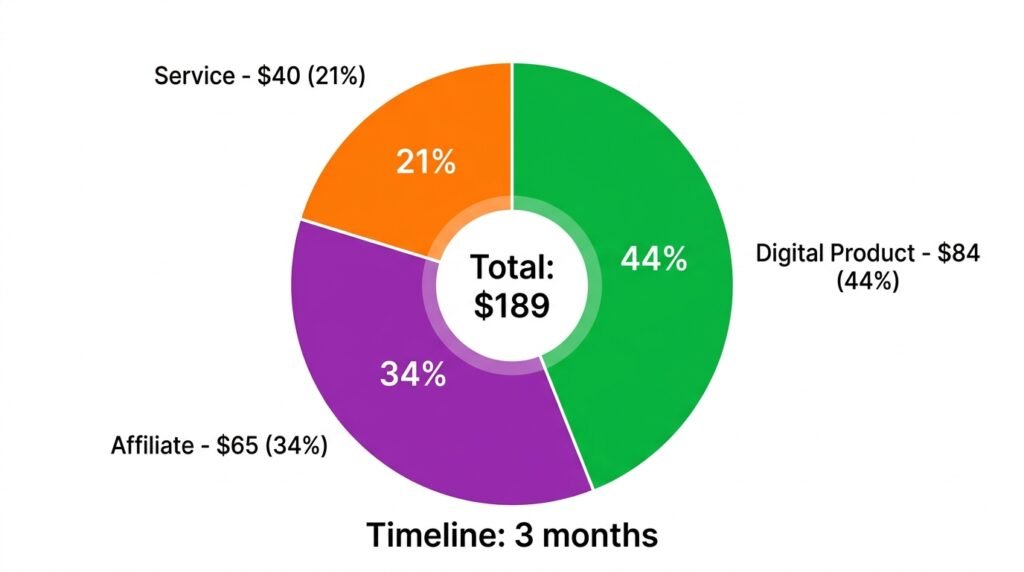
- Real breakdown: exactly how I made $189 in 3 months
- A phase-by-phase action plan based on your traffic level
Let’s turn your blog into something that pays for itself.

Before You Start: The 3 Rules of Blog Monetization
First, before you add a single affiliate link, understand these three rules. They’ll save you months of frustration.
Rule 1: Don’t monetize too early
However tempting it is to add ads in month one — don’t. If you have under 500 monthly visitors, focus on content. With no traffic:
- Ads pay pennies ($0.50–$2/month)
- Affiliate links don’t click (nobody sees them)
- Nobody buys digital products (no trust yet)
As a result, monetizing too early wastes time you should spend writing. Get traffic first — see our How to Get Your First 100 Readers guide for the exact playbook.
Rule 2: Trust before selling
First, build value. Then, ask for the sale. For example, if your first email to a new subscriber is “buy my thing,” they’ll unsubscribe immediately. But if you send three helpful emails first, they’ll click when you finally recommend something.
Rule 3: One thing at a time
Don’t add ads, affiliates, and a shop all at once. Start with one method, learn it, then add another. In practice, each monetization method has its own learning curve — trying all four simultaneously leads to mediocre results in all four.
Method 1: Affiliate Marketing (Easiest for Beginners)
What it is
You recommend a product or service. If someone buys through your unique link, you earn a commission — usually 10–50% of the sale.
Why it works for beginners
First, no product creation. Then, no customer support. Finally, no upfront investment. Just honest recommendations of tools you already use.
Best affiliate programs for WordPress bloggers (2026)
| Program | Commission | Notes |
|---|---|---|
| Bluehost | $65–$130 per signup | One of the highest paying |
| SiteGround | $50–$100 per sale | Great for hosting comparisons |
| WP Rocket | 20% recurring | Paid caching plugin (I use it) |
| ConvertKit | 30% recurring for 12 months | Email marketing for creators |
| Cloudways | $50–$125 per sale | Managed hosting |
| Elegant Themes (Divi) | 50% | Page builder theme |
| Kadence WP | 20–30% | Theme & blocks (relevant for this site) |
How to start (step by step)
Step 1: Sign up for individual programs — most have free applications.
Step 2: Alternatively, join an affiliate network:
- ShareASale — thousands of programs
- Impact — premium brands
- Rakuten Advertising — established network
Step 3: Get your unique affiliate link from each program’s dashboard.
Step 4: Write honest, helpful content that includes the link naturally. For example, instead of “Buy WP Rocket here,” write “I use WP Rocket for caching — here’s why it’s worth $59/year.”
Step 5: Disclose your affiliate relationship. This is legally required (FTC in the US, ASA in the UK). Add a short line at the top of any post with affiliate links: “This post contains affiliate links. If you buy through them, I earn a small commission at no extra cost to you.”
How I made my first affiliate sale
I wrote a detailed comparison of two hosting providers — see our Choosing the Right Hosting guide for the format I used. First, I recommended one host genuinely. Then, I included my affiliate link in the “My recommendation” section. As a result, a reader bought hosting — I earned **$65**. That was the start of my first $100 milestone.
💡 Pro tip: Promote products you actually use. Readers can smell fake recommendations from a mile away — and once trust is gone, it doesn’t come back.
Method 2: Digital Products (Higher Earnings, More Work)
What it is
Create something once, sell it many times. E-books, templates, mini-courses, checklists.
Why it’s good
First, you keep 100% of the profit. Then, no commissions to platforms. Finally, you build an asset that generates income while you sleep.
What you can create (even with basic skills)
| Product | Time to create | Price | Effort |
|---|---|---|---|
| PDF checklist (e.g., “WordPress Launch Checklist”) | 2 hours | $5–$10 | Low |
| Email course (5 emails) | 1 day | $20–$30 | Medium |
| Site speed e-book | 1 week | $10–$20 | Medium |
| Template pack (Kadence starter layouts) | 2–3 days | $15–$25 | Medium |
| Mini video course (3 modules) | 1–2 weeks | $47–$97 | High |
How to sell digital products on WordPress
First, choose a delivery method. Then, set up your store.
Option A: WooCommerce (free)
- Install WooCommerce via Plugins → Add New
- Run the setup wizard — this takes 5 minutes
- Create a product: Products → Add New
- Under Product Data, choose “Simple product”
- Check “Virtual” and “Downloadable” — this removes shipping
- Upload your PDF or file under “Downloadable files”
- Set a price and publish
For a full walkthrough, see our Installing WooCommerce & Setup Wizard guide.
Option B: Easy Digital Downloads (simpler for digital-only)
- Install Easy Digital Downloads (free)
- Create a download — same process, fewer options
- Recommended if you’re only selling digital files
My first digital product
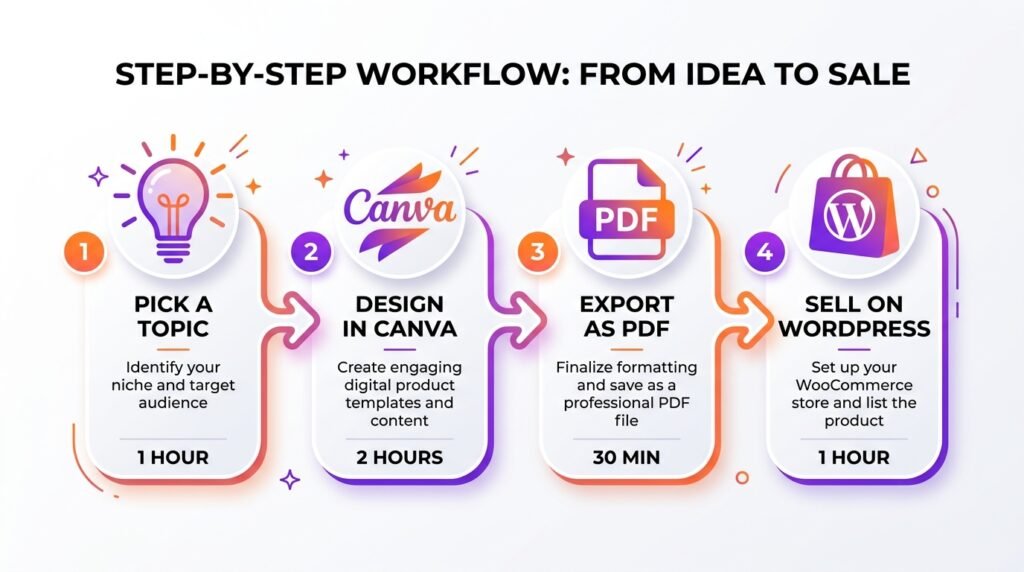
First, I created a “WordPress Security Checklist” PDF — 15 pages. Then, I sold it for $7**. **As a result,** I sold **12 copies in the first month = $84. That plus one affiliate sale got me over $100.
Tools to create digital products
| Tool | Best for | Cost |
|---|---|---|
| Canva | Checklists, e-books, cover designs | Free |
| Google Docs | Writing → export as PDF | Free |
| Loom | Screen recording for video tutorials | Free tier |
| Notion | Templates, structured content | Free tier |
💡 Pro tip: Your first digital product should take under a day to create. Don’t spend weeks on something nobody’s bought yet. Launch a simple version, learn what resonates, then expand.
Method 3: Display Ads (Slow but Passive)
What it is
Ad networks place banners on your site. You get paid per 1,000 impressions (CPM) or per click.
Why it’s slow for beginners
However, most ad networks require 10,000–50,000 monthly visits to even apply. And even when you qualify, CPMs are low ($2–$10 per 1,000 impressions). As a result, at 5,000 monthly visitors, you’d earn roughly $10–$50/month from ads alone.
Options for beginners (ranked by traffic requirement)
| Network | Minimum traffic | Typical CPM | Notes |
|---|---|---|---|
| Google AdSense | Any (approval easier after 1,000 visits/mo) | $2–$10 | Easiest to join |
| Ezoic | 10,000 sessions/month | $10–$30 | Requires platform integration |
| Mediavine | 50,000 sessions/month | $20–$40 | Premium rates |
| AdThrive | 100,000 pageviews/month | $25–$50 | Highest rates, hardest to join |
Should you start with ads?
No — not until you have at least 10,000 monthly visitors. Before that:
- Ads pay pocket change
- They slow down your site (each ad script adds 200–500ms load time)
- AdSense rejections are common for new sites
My advice: Focus on affiliate and digital products first. Add ads later as passive income once you’re at 10,000+ sessions/month.
Method 4: Sponsored Posts & Reviews
What it is
Companies pay you to write about their product or service. However, they’ll only pay if your audience is worth reaching.
Requirements
- Traffic: 5,000+ monthly visitors minimum
- Audience: engaged readers (comments, shares, email subscribers)
- Niche: WordPress, web development, or tech — relevant to sponsors
How much you can charge
| Blog size | Typical rate per post |
|---|---|
| 5,000–10,000 monthly visitors | $100–$300 |
| 10,000–50,000 monthly visitors | $300–$800 |
| 50,000+ monthly visitors | $1,000–$5,000+ |
Where to find sponsors
First, pitch directly to companies you already use — hosting providers, plugin developers, theme shops.
Then, join marketplaces:
- Bloggers in Charge — mid-tier sponsor-ships
- Cooperatize — content marketing campaigns
- TapInfluence — larger brands
Finally, as your site grows, brands will email you directly. However, vet them carefully — not every offer is worth your reputation.
Is it realistic for your first $100?
Probably not. Sponsored posts usually require at least 5,000 monthly visitors. But it’s worth knowing for later — sponsored posts can become your biggest income source once your blog grows.
Method 5: Services & Consulting (Fastest Path to $100)
What it is
Use your WordPress skills to help others — setup, troubleshooting, speed optimization. This is the fastest way to make your first $100 because it doesn’t require traffic.
Typical rates
| Service | Beginner rate | Experienced rate |
|---|---|---|
| WordPress installation | $25–$50 | $75–$150 |
| Site speed audit | $50–$100 | $150–$400 |
| Plugin conflict fix | $25–$75 | $100–$250 |
| Full site setup | $100–$300 | $500–$1,500 |
Why it’s effective
First, your blog builds trust. Then, someone reads your guide on installing WordPress — see our Install WordPress in 10 Minutes guide — and hires you to do it for them. As a result, you monetize your knowledge before you have traffic.
How to start
- Create a “Work with Me” page on your site (Pages → Add New)
- List 2–3 specific services with fixed prices:
- “WordPress Installation — $50”
- “Site Speed Audit — $100”
- “Plugin Conflict Fix — $75”
- Add a contact form (see our Must-Have WordPress Plugins guide for WPForms setup)
- Mention your services on your About page and at the end of relevant posts
My experience
I charged $40 for a one-hour site setup call.** **First,** I did three calls in my first month. **As a result,** that was **$120 — over $100 without creating any product.
My First $100 Breakdown (Real Numbers)
Here’s exactly how I crossed the first $100 mark in 3 months:
| Source | Amount | Notes |
|---|---|---|
| Affiliate: Hosting sale (Bluehost) | $65 | One reader bought hosting |
| Digital product: Security checklist PDF | $84 | 12 copies × $7 |
| Service: Site setup consultation | $40 | One 1-hour call |
| Total | $189 |
Timeline: 3 months after launching the blog.
**I didn’t make $1,000 overnight.** But that $189 showed me that blogging can pay for its own hosting ($15/month) and coffee. As a result, it motivated me to keep going — which is the only thing that separates blogs that succeed from blogs that fade.
What to Avoid (Monetization Mistakes)
First, here are the mistakes that kill blogs before they earn:
| ❌ Mistake | Why it’s bad |
|---|---|
| Too many ads | Annoying, slows the site, drops earnings per visitor |
| Pop-up affiliate links | Desperate and ineffective — readers leave |
| Promoting junk products | Kills trust forever; readers won’t return |
| Ignoring disclosures | Illegal in many countries (FTC, ASA require clear disclosure) |
| Monetizing before traffic | Waste of time — you’re selling to nobody |
| Recommending things you don’t use | Readers can tell — and they’ll call you out |
💡 The golden rule of monetization: if you wouldn’t recommend it to a friend, don’t recommend it on your blog.
How Much Traffic Do You Really Need?
This table is the most useful thing in this guide. Match your traffic to the right monetization method:
| Monthly visitors | What’s realistic |
|---|---|
| 0–500 | Focus on content, not money. Maybe 1 affiliate link per post. |
| 500–2,000 | Start affiliate seriously. Consider a $5–$10 digital product. |
| 2,000–5,000 | Add services. Affiliate should be consistent ($50–$200/month). |
| 5,000–10,000 | Display ads (Ezoic). Digital product sales grow. |
| 10,000+ | Full monetization — ads, affiliates, products, sponsorships. |
For example, at 500 visitors/month, don’t expect $100. **However,** at 2,000 visitors/month, $100 is very achievable with affiliate + one small product.
The First $100 Action Plan (Phase by Phase)
Phase 1 (0–500 visitors) — Build foundation
- □ Write 15+ helpful articles (not monetized yet)
- □ Set up email list — see our How to Build an Email List guide
- □ Join 2–3 affiliate programs (hosting, tools you use)
- □ Create one low-effort digital product (checklist, template, under $10)
Phase 2 (500–2,000 visitors) — Start earning
- □ Add affiliate links naturally to relevant content
- □ Promote your digital product in emails and after posts
- □ Offer one service (e.g., “30-min WordPress help” for $30)
- □ Track earnings — aim for $25–50/month
Phase 3 (2,000+ visitors) — Hit $100
- □ Optimize best-performing affiliate posts
- □ Raise digital product price to $15–20 (add more value)
- □ Increase service rate
- □ Celebrate — you made your first $100
Frequently Asked Questions
Q1: How long does it take to make the first $100 from a blog?
2–4 months for most beginner blogs — but it depends on your method. Services can earn $100 in 2 weeks (no traffic needed). Affiliate + digital products usually take 3–6 months. Display ads take 6–12 months. If you want speed, start with services.
Q2: Which monetization method is best for beginners?
Affiliate marketing — because it requires no product creation and works with any traffic level. However, the fastest path to $100 is services (WordPress setup, troubleshooting). My recommendation: start with services to fund your blog, then layer in affiliate and digital products as traffic grows.
Q3: Do I need an LLC or business entity to monetize my blog?
**Not for your first $100.** **However,** once you’re consistently earning $500+/month, consider registering a business — for tax benefits and liability protection. For example, in the US, an LLC costs $50–$500 to set up depending on your state. Consult a local accountant before deciding.
Q4: What’s the most common monetization mistake?
Monetizing too early. First, you need traffic. Then, you need trust. Finally, you can sell. As a result, blogs that wait until 1,000+ visitors/month earn more than blogs that plaster ads from day one — because their readers actually engage.
Q5: How do I disclose affiliate links legally?
First, add a short disclosure at the top of any post containing affiliate links: “This post contains affiliate links. If you buy through them, I earn a small commission at no extra cost to you.” Then, add a full disclosure to your Privacy Policy page. As a result, you comply with FTC (US), ASA (UK), and similar regulations worldwide.
Q6: Should I sell on WooCommerce or Easy Digital Downloads?
For digital products only: Easy Digital Downloads (simpler). For digital + physical products: WooCommerce (more flexible). However, if you’re already using WooCommerce for something else, stick with it — one system is simpler than two. See our Installing WooCommerce guide for setup.
Q7: When should I quit my day job and blog full-time?
Not until you’re earning 6–12 months of expenses in savings AND consistent blog income for 6+ months. For example, if your monthly expenses are $3,000, don’t quit until you’ve earned $3,000+/month for six consecutive months and have $18,000–$36,000 saved. Blogging income is volatile — the buffer protects you during slow months.
Key Takeaways
- Don’t monetize too early — wait for 500+ monthly visitors (or start with services)
- Affiliate marketing is the easiest starting point — hosting programs pay $50–$130/sale
- Create one small digital product — a $7 checklist can earn $84 in a month
- Services are the fastest path to $100 — no traffic required
- Display ads require 10,000+ sessions/month to be worth it
- My first $189 came from affiliate + digital products + services in 3 months
- Match your method to your traffic level — the table above is your road map
- Trust before selling — always recommend products you actually use
What’s Next?
You have a monetized blog. However, the real challenge is scaling — turning that $100 into $1,000.
👉 Next in this series: Must-Have WordPress Plugins — the tools that make monetization possible (and won’t slow your site down).
Which monetization method fits your situation best right now? Services, affiliate, or digital products? Let me know in the comments — I’ll help you plan your first $100.
Related Reading
- How to Get Your First 100 Readers — traffic before monetization
- How to Build an Email List from Day One — the asset that makes sales repeatable
- Must-Have WordPress Plugins — the tools for selling digital products
- Installing WooCommerce & Setup Wizard — sell your first digital product
- Choosing the Right Hosting — the affiliate programs that pay best
- How to Write Your First Blog Post — content that converts readers into buyers