
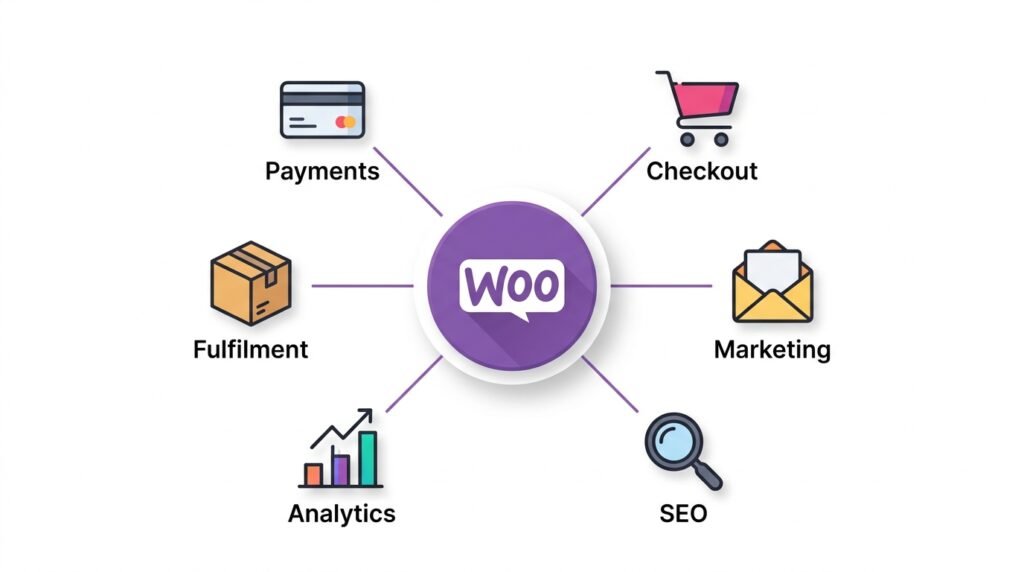
WooCommerce extensions are plugins built specifically for ecommerce — they work with products, carts, orders, taxes, and checkout flows. The base WooCommerce plugin is free and handles the fundamentals. Extensions add everything else: payment gateways, multi-step checkouts, abandoned cart recovery, marketing automation, and shipping label printing.
The challenge isn’t finding an extension. Over 3.6 million active stores use WooCommerce, and thousands of extensions exist. The challenge is choosing the right ones — and avoiding the trap of installing every plugin that looks useful.
In practice, the most successful WooCommerce stores in 2026 are not the ones with the most extensions. They’re the ones with the right extensions: well-maintained, high-quality, and tied to a specific business goal.
This guide covers:
- What extensions are — how they differ from general WordPress plugins
- How to choose — the two-question test before installing anything
- 30 essential extensions by category — payments, marketing, SEO, analytics, fulfilment
- The official Marketplace vs third-party sources — where to buy, where to avoid
- Free vs paid — what the pricing actually means
- Building your own — for developers, with the QIT testing platform
- 2026 trends — AI, agentic commerce, and consolidation
- Avoiding plugin bloat — the smart extension strategy
Let’s explore the ecosystem that makes WooCommerce the world’s most flexible ecommerce platform.
Part 1: What Are WooCommerce Extensions?
WooCommerce extensions are plugins built specifically for ecommerce stores. However, they’re different from general WordPress plugins — form builders, galleries, and page builders work on any WordPress site, while WooCommerce extensions interact directly with products, carts, orders, taxes, customer data, and checkout flows.
For example, a contact form plugin doesn’t know what a cart is. A WooCommerce extension does.
What extensions add by category
| Category | What extensions add |
|---|---|
| Payments | New gateways — Stripe, Square, PayPal, WooPayments |
| Checkout | One-click upsells, order bumps, multi-step checkout |
| Marketing | Automated emails, abandoned cart recovery, social integrations |
| SEO | Product schema, XML sitemaps, keyword optimization |
| Analytics | Customer insights, conversion tracking, profit reporting |
| Fulfilment | Shipping labels, inventory management, tax calculation |
The three tiers of extensions
WooCommerce classifies extensions into three tiers. First, there are extensions you need to run the store. Then, extensions that help you understand it. Finally, extensions that help you reach more shoppers.
| Tier | Purpose | Examples |
|---|---|---|
| Essential | Run and protect your store | WooPayments, WooCommerce Shipping, WooCommerce Tax, Jetpack |
| Growth | Understand and improve your store | Google for WooCommerce, Google Analytics for WooCommerce, Jetpack CRM |
| Marketing | Reach shoppers more effectively | Pinterest for WooCommerce, TikTok for WooCommerce, MailPoet, Klaviyo |
💡 Prioritize Essential extensions first. Growth and Marketing extensions come later — after you’ve validated your product and understand your customer.
Part 2: How to Choose the Right Extensions
With thousands of extensions available, it’s tempting to install everything that looks useful. However, that’s a mistake. According to industry analysis, the most successful WooCommerce stores in 2026 are not the ones with the most plugins — they’re the ones with the right ones.
The two-question test
Before installing any extension, ask:
- Will it replace manual tasks or unlock revenue?
- Will it work well with our current setup?
If the answer is yes to both, it’s worth evaluating. If either answer is no, skip it.
What to look for when evaluating
| Factor | What to check |
|---|---|
| Compatibility | Supports your WordPress, WooCommerce, and PHP versions |
| Support | Active developers, clear docs, recent updates, quick ticket responses |
| Security | Trusted developers, regular security updates, transparent changelogs |
| Business goals | Ties to a clear outcome — if it doesn’t deliver a tangible result, skip it |
In practice, extensions worth paying for in 2026 are the ones running complex operational logic. It’s the kind of work that breaks the moment you stop maintaining it.
The seven extension categories
To keep things manageable, group extensions into seven areas:
- Payments and checkout — accepting money and reducing friction
- Marketing conversion — turning visitors into customers
- SEO — helping customers find you in search
- Product management — organizing and displaying your catalog
- Fulfilment — shipping, taxes, and inventory
- Customer experience — post-purchase engagement
- Analytics and reporting — understanding what’s working
Each category has a distinct role, and each is an area where WooCommerce’s base plugin has gaps.
Part 3: 30 Essential Extensions by Category
Here are the most important extensions for each category, with recommendations based on what actually works in 2026.
Payments & Checkout
| Extension | What it does | Best for |
|---|---|---|
| WooPayments | Accept payments directly through WooCommerce | Most stores — native, no redirect |
| Stripe Payment Gateway | Accept credit cards via Stripe | Stores wanting Stripe’s advanced features |
| Square for WooCommerce | Sync products, orders, customers with Square | Retailers with physical POS |
| CartFlows | Multi-step checkout, order bumps, upsells | Stores wanting to increase AOV |
Marketing & Conversion
| Extension | What it does | Best for |
|---|---|---|
| Google for WooCommerce | Sync products with Google listings and ads | Getting products in front of Google shoppers |
| MailPoet | Email campaigns from inside WordPress | Beginners wanting simple email marketing |
| Klaviyo for WooCommerce | Customer data for email and SMS | Advanced segmentation |
| TikTok for WooCommerce | Connect store to TikTok marketing | Reaching younger audiences |
Analytics & Growth
| Extension | What it does | Best for |
|---|---|---|
| Google Analytics for WooCommerce | Track store activity and customer behavior | Understanding visitor behavior |
| Jetpack CRM | Manage customers, leads, and sales | Customer relationship management |
| Jetpack Search | Improve product search | Large catalogs (500+ products) |
SEO
| Extension | What it does | Best for |
|---|---|---|
| Yoast SEO | Optimize content, XML sitemaps, readability | Beginners wanting simple SEO guidance |
| RankMath | Advanced SEO with schema markup | Stores wanting more control |
Performance
| Extension | What it does | Best for |
|---|---|---|
| Imagify | Compress and resize images | Image-heavy stores |
| Jetpack | Security, performance, site management | New stores wanting simplified management |
Fulfilment
| Extension | What it does | Best for |
|---|---|---|
| WooCommerce Shipping | Buy and print discounted labels | US stores shipping physical products |
| WooCommerce Tax | Automated sales tax at checkout | US stores needing automated calculation |
| ShipStation | Multi-carrier label printing and tracking | High-volume stores (100+ orders/month) |
💡 Start with the Essential tier. Add Growth extensions when you need them. Add Marketing extensions only when you’re ready to scale — not before.
Part 4: The Official WooCommerce Marketplace
The WooCommerce Marketplace is the official source for extensions. It offers free and premium extensions for nearly every kind of store.
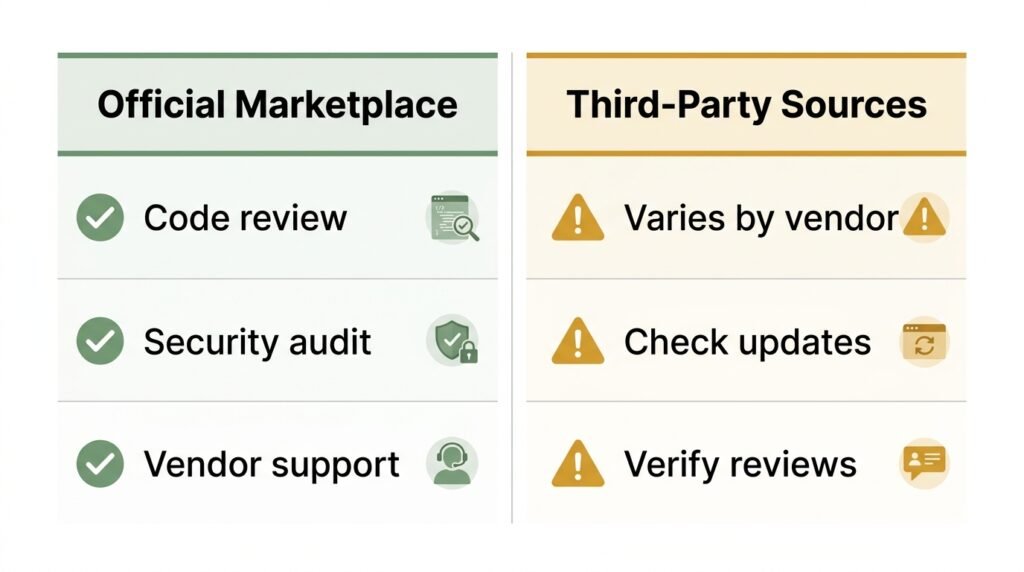
What you get from the official marketplace
- Quality assurance — vendors must offer high-quality, secure products and provide strong customer support
- Code review — extensions are reviewed for originality, security, and alignment with WooCommerce standards
- Business review — ensures there’s a viable business model behind the extension
- Subscription management — purchases are handled through your WooCommerce.com account
Free vs paid — what the pricing means
Free to install doesn’t always mean free to use. Payment extensions often charge transaction fees. Email tools include a certain number of contacts before requiring a paid plan.
| Type | What to expect |
|---|---|
| Free | Foundational tools, no recurring subscription fee |
| Paid | Premium features, priority support, advanced functionality |
| Freemium | Free core, paid add-ons or usage limits |
Installing from the marketplace
- Go to WooCommerce → Extensions → My Subscriptions
- Find the extension under “Available to use”
- Click Install
- The extension installs automatically — no ZIP upload required
Part 5: Third-Party Extension Sources
Beyond the official marketplace, extensions are available from three main sources:
CodeCanyon — a large marketplace with thousands of WooCommerce extensions. Prices are often lower than the official marketplace, but quality varies widely.
Independent developers — many high-quality extensions are sold directly. This is where niche extensions live (industry-specific shipping, unusual payment gateways).
WordPress.org — thousands of free WooCommerce extensions. Quality is highly variable, and you’re relying on the developer for updates and support.
What to check when using third-party sources
| Factor | Why it matters |
|---|---|
| Update frequency | Extensions not updated in 6+ months may have security vulnerabilities |
| Support availability | Can you get help if something breaks? |
| Reviews and ratings | What do other users say about reliability? |
| HPOS compatibility | Will it work with WooCommerce’s new order storage? |
For WordPress.org plugins specifically, check the “Last Updated” date and the support forum activity before installing.
Part 6: Building Your Own Extensions
If you’re a developer (or aspiring to be one), you can build your own WooCommerce extensions. This is how the ecosystem grows — and how you create exactly the functionality your store needs.
Getting started
- Design a simple extension — learn extension architecture and best practices
- Build your first extension — start with a simple admin page or product field
- Master core concepts — plugin headers, lifecycle management, and security
Important: Internal vs public code
Not all WooCommerce code is intended for use by extensions. Classes in the Automattic\WooCommerce\Internal namespace and code marked with @internal are for WooCommerce core use only. Backwards compatibility between releases is not guaranteed — your extension may break if you use them.
Quality Insights Toolkit (QIT)
QIT is a testing platform developed by WooCommerce for plugins and themes. It lets developers run managed tests to ensure extensions are reliable, secure, and compatible.
Key features:
- Managed test suites — end-to-end tests, activation tests, security scans, PHPStan analysis
- Custom E2E testing — write and run your own Playwright-based tests
- Continuous quality checks — integrate via CLI, GitHub Actions, and more
Submitting to the WooCommerce Marketplace
Getting your extension into the official marketplace means access to 3.6 million+ active stores. The submission process has two stages: a business review (product fit, business model) and a code review (originality, security, quality).
Part 7: 2026 Ecosystem Trends
The WooCommerce ecosystem is evolving rapidly. Here are the trends shaping it in 2026.
AI and agentic commerce
WooCommerce is at a turning point in 2026. The Model Context Protocol and convergence of open source technologies enable it to function as a layer any AI system can plug into. As a result, store owners and consumers accomplish more with less friction.
Agentic commerce represents a fundamental shift in how customers discover and purchase products online. Expect AI-powered extensions that:
- Automatically personalize product recommendations
- Generate product descriptions and ad copy
- Predict customer behavior and churn risk
- Automate customer support via chatbots
Performance and consolidation
The 2026 Metorik Insights Report — built from over 65 million orders totaling more than $6.6 billion in revenue — reveals that merchant sophistication is increasingly shaped by questions of performance, compatibility, and maintenance.
The takeaway: the most successful stores are the ones with the right plugins, not the most. Well-maintained, high-quality extensions deliver real value without bloat.
Part 8: Avoiding Plugin Bloat — The Smart Extension Strategy
Plugin bloat is one of the biggest threats to WooCommerce store performance. Every extension adds code, database queries, and potential conflicts with other plugins. As a result, a store with 40 plugins often loads slower than a store with 12.
The bloat checklist
| Red flag | What it means |
|---|---|
| More than 15 active extensions | Most stores don’t need more than 10–15 well-chosen extensions |
| Extensions you don’t actively use | If you haven’t used it in 3 months, deactivate and delete it |
| Duplicate functionality | Two plugins doing the same thing = conflicts and slowdowns |
| Extensions without recent updates | Security risk and compatibility risk |
| Extensions from unknown developers | Potential security vulnerabilities |
The smart extension strategy
- Start with Essentials — WooPayments, WooCommerce Shipping, WooCommerce Tax, Jetpack
- Add Growth extensions as you need them — Google for WooCommerce, Google Analytics, Jetpack CRM
- Add Marketing extensions when you’re ready to scale — MailPoet, Klaviyo, Pinterest, TikTok
- Audit regularly — every quarter, review your extensions. Remove anything you haven’t used.
💡 Instead of asking “what extensions should I install”, ask “what do I want to improve this quarter?” Faster checkout? More repeat sales? Less manual work? Let the answers drive your extension choices.
Frequently Asked Questions
Q1: How many WooCommerce extensions should I have?
Most stores work well with 10–15 active extensions. Above 20, you risk performance issues, conflicts, and security exposure. Audit quarterly and remove anything you haven’t used in 3 months.
Q2: Are free extensions as good as paid ones?
For basic functionality, yes. For example, WooPayments and WooCommerce Shipping are free and fully supported. However, complex features — advanced reporting, multi-carrier shipping, subscription management — often require paid extensions because they involve ongoing operational work.
Q3: What’s the difference between WooCommerce extensions and regular WordPress plugins?
WooCommerce extensions interact with carts, orders, products, and checkout flows. Regular WordPress plugins don’t know those exist. For example, a contact form plugin works on any WordPress site; a WooCommerce checkout extension only works on stores.
Q4: Can I use extensions from CodeCanyon on my store?
Yes, but verify quality first. Check the last update date, read reviews, and test on a staging site. Extensions from CodeCanyon don’t go through the same review as the official WooCommerce Marketplace.
Q5: Do I need to know how to code to build an extension?
No. There are scaffolds like create-woo-extension that generate the boilerplate. However, some PHP and WordPress plugin knowledge helps significantly — WooCommerce extensions are more complex than basic plugins.
Q6: What is QIT and do I need it?
QIT (Quality Insights Toolkit) is a testing platform for WooCommerce plugin developers. If you’re building extensions for the marketplace, it’s required. If you’re just using extensions on your own store, you don’t need it.
Q7: How do I know if an extension is compatible with HPOS?
Check the extension’s change for HPOS compatibility, or search for “HPOS” in the WordPress.org plugin repository. For more on HPOS, see our Managing Orders with HPOS guide.
Key Takeaways
- WooCommerce extensions are plugins built specifically for ecommerce — they interact with products, carts, orders, and checkout
- Three tiers: Essential (run the store), Growth (understand it), Marketing (reach shoppers)
- The two-question test: will it replace manual tasks or unlock revenue, and will it work with your setup?
- Official Marketplace offers quality-assured extensions with code review and vendor support
- Third-party sources (CodeCanyon, WordPress.org, independent developers) vary in quality — verify before installing
- Avoid plugin bloat: most successful stores have 10–15 extensions, not 40
- 2026 trends: AI, agentic commerce, and quality-over-quantity
- Audit quarterly — remove extensions you haven’t used in 3 months
Related Reading
- WooCommerce Analytics & Reporting — how to track what your extensions actually deliver
- WooCommerce Security & Performance — why plugin bloat slows your store
- WooCommerce Abandoned Cart Recovery — one of the highest-ROI extensions
- Google Listings & Ads for WooCommerce — the Growth-tier extension worth installing first
- Choosing the Right Hosting — infrastructure that handles your extension stack
- WooCommerce Maintenance & Growth — the quarterly audit routine
What extensions are you using? Are there any you’d recommend that I didn’t cover? Let me know in the comments below — I read every one.