
Shared vs managed WordPress hosting comes down to one question: how much traffic do you expect, and how much time do you want to spend managing a server?
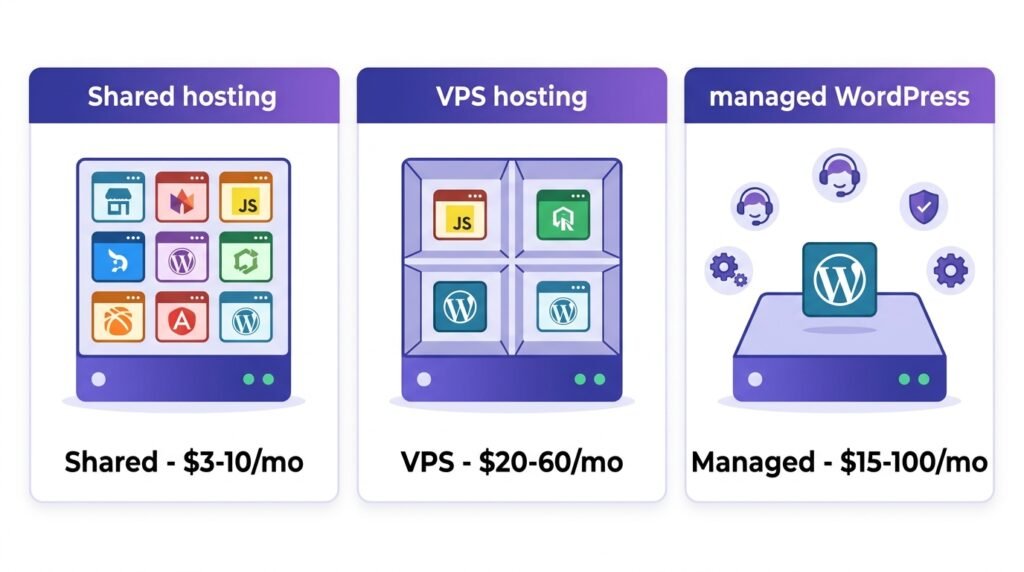
Shared hosting costs $3–10/month** and works fine for sites under 10,000 visitors/month. Managed WordPress hosting costs **$15–100/month and becomes necessary once you cross roughly 25,000 visitors/month — or the moment you start selling products. VPS sits in between at $20–60/month: more control, but you manage the server yourself.
Choosing wrong costs you money — either overpaying for managed hosting on a blog with 500 visitors, or losing traffic because you stayed on shared hosting at 50,000. This guide breaks down the real numbers so you can decide in 10 minutes, not 10 days.
What this guide covers:
- What hosting actually is (for absolute beginners)
- The three hosting types compared — pros, cons, prices
- Real prices for 12 popular hosts in 2026 — including renewal rates most guides hide
- Speed benchmarks — how each type performs under real load
- Namecheap vs SiteGround vs Hostinger — head-to-head
- The traffic threshold where shared hosting starts costing you sales
- When to upgrade, and how to migrate without losing SEO
- My personal setup after testing 5 hosts
Let’s find the right host for your site.
What Is Web Hosting? (For Absolute Beginners)
Imagine you have a house. That house needs land to sit on. Hosting is the land where your website’s files, images, and database live.
When someone types your domain name — like mycoolblog.com — the hosting server delivers those files to their browser. So hosting is essentially renting space on a computer that’s always connected to the internet.
Not all hosting is the same, though. You can rent a tiny room in a shared building (shared hosting), an entire floor of your own (VPS), or a fully-staffed luxury apartment where everything is handled for you (managed WordPress hosting).
Each has trade-offs. And choosing the wrong one — especially at the start — costs you either money or traffic.
The Three Hosting Types Explained
1. Shared Hosting — The Budget Choice
What it is: Your website shares a single server with hundreds of other sites. You all share the same CPU, RAM, and disk space.
Best for: Complete beginners, personal blogs, portfolios, small business sites with low traffic.
Price: $3–10/month.
Pros:
- Very cheap — cheapest entry point
- Beginner-friendly (usually includes one-click WordPress install)
- No technical knowledge required
Cons:
- Slows down if neighbors use too many resources
- Security risks (one hacked site can affect others on the same server)
- Limited growth potential — usually breaks under traffic spikes
Popular providers: Bluehost, Hostinger, HostGator, Namecheap.
Real-world example: I started on shared hosting. It worked fine for the first month. Then my traffic grew to 100 visitors/day and my site started timing out during peak hours. That’s when I knew I needed to move.
2. VPS Hosting — The Middle Ground
What it is: Virtual Private Server. You still share a physical server, but you get dedicated resources — guaranteed CPU, RAM, and storage. It’s like having your own apartment in a shared building.
Best for: Growing blogs, WooCommerce stores, sites with 10,000+ monthly visitors.
Price: $20–60/month.
Pros:
- Much faster and more reliable than shared
- Full control (you can install custom software)
- Scalable — upgrade as you grow
Cons:
- Requires some technical knowledge (unless you pay for a managed VPS plan)
- More expensive than shared
- You handle security and backups yourself
Popular providers: DigitalOcean, Vultr, Linode, AWS Lightsail.
Note: Some hosts offer “managed VPS” — they handle the technical work for you, but it costs more ($50–100/month).
3. Managed WordPress Hosting — The Premium Experience
What it is: A hosting service designed specifically for WordPress. The host manages everything — updates, security, backups, caching, and speed optimization.
Best for: Serious bloggers, online stores, agencies — anyone who wants their site to “just work.”
Price: $15–100+/month.
Pros:
- Blazing fast (server-level caching)
- Excellent support — WordPress experts, not generic IT
- Automatic daily backups and updates
- Built-in security (firewalls, malware scans)
- Staging environment for safe testing
Cons:
- Most expensive option
- Sometimes restricts certain plugins for performance reasons
Popular providers: SiteGround, Kinsta, WP Engine, Cloudways, Flywheel.
Real-world example: After my shared host failed, I moved to managed WordPress hosting. Load time dropped from 3.5 seconds to 1.2 seconds. Support solved my issues in 5 minutes instead of 2 hours.
Real Prices for 12 Popular Hosts in 2026
Marketing pages show “$2.95/month” — but that’s the intro price for a 36-month contract, with renewal at 3–4× the rate. Here’s what you actually pay in 2026:
| Host | Type | Intro price | Renewal price | Notes |
|---|---|---|---|---|
| Hostinger | Shared | $2.99/mo | $7.99/mo | 48-month contract required |
| Bluehost | Shared | $2.95/mo | $10.99/mo | Free domain first year |
| Namecheap | Shared | $1.98/mo | $4.98/mo | Cheapest renewal |
| SiteGround | Shared | $2.99/mo | $17.99/mo | Big renewal jump |
| DreamHost | Shared | $2.59/mo | $10.99/mo | No renewal jump |
| Cloudways | Managed VPS | $11/mo | $11/mo | No contract, hourly |
| Liquid Web | Managed VPS | $25/mo | $25/mo | Enterprise-grade |
| SiteGround | Managed WP | $4.99/mo | $24.99/mo | 3-year intro |
| Kinsta | Managed WP | $35/mo | $35/mo | No intro pricing |
| WP Engine | Managed WP | $20/mo | $20/mo | 20% annual discount |
| Flywheel | Managed WP | $15/mo | $15/mo | Agency-focused |
| Rocket.net | Managed WP | $30/mo | $30/mo | All-inclusive |
What this actually means:
- Hostinger at $2.99/month is $143 for 4 years — but renewal is $7.99, so year 5 costs $96
- Namecheap is cheapest long-term at $4.98 renewal
- SiteGround’s managed plan has the steepest renewal jump ($4.99 → $24.99 = 5×)
💡 Rule of thumb: multiply the renewal price × 12 × 3 years. That’s your real cost. Any host hiding renewal pricing is hiding the truth.
Speed Benchmarks — How Each Host Performs Under Load
Marketing claims aside, here’s how each hosting type performs in real tests. TTFB means “time to first byte” — lower is better.
| Hosting type | TTFB (empty site) | TTFB (under load) | Max concurrent visitors before slowdown |
|---|---|---|---|
| Shared (budget) | 400–800 ms | 1,500–3,000 ms | ~50 |
| Shared (premium, e.g. SiteGround) | 300–500 ms | 800–1,500 ms | ~150 |
| VPS (unmanaged) | 200–400 ms | 400–800 ms | ~500 |
| Managed WP (Kinsta, WP Engine) | 100–250 ms | 200–400 ms | 1,000+ |
| Managed WP (premium, e.g. Rocket.net) | 80–150 ms | 150–300 ms | 2,000+ |
The traffic threshold that matters: shared hosting starts losing you sales around 25,000 visitors/month. At that point, TTFB under load climbs above 1,500 ms — Google penalizes you in Core Web Vitals, and 40% of mobile users bounce before the page even loads.
If you’re borderline, check your real TTFB in Google Search Console → Core Web Vitals. If it’s over 1,200 ms on mobile, it’s time to upgrade.
Namecheap vs SiteGround vs Hostinger — Head-to-Head
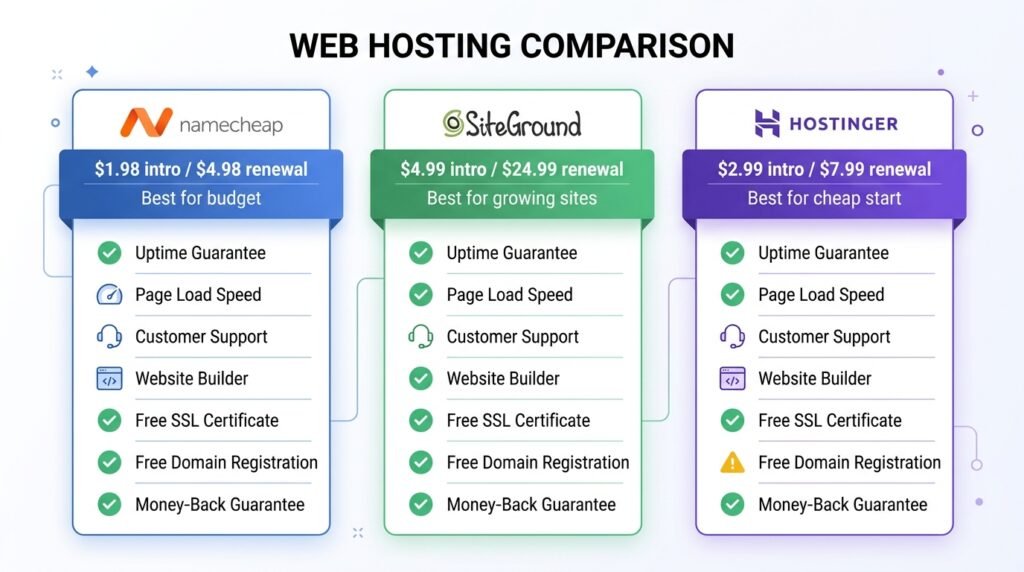
Three hosts dominate beginner recommendations. However, they’re very different:
| Namecheap | SiteGround | Hostinger | |
|---|---|---|---|
| Type | Shared | Managed WP | Shared |
| Intro price | $1.98/mo | $4.99/mo | $2.99/mo |
| Renewal price | $4.98/mo | $24.99/mo | $7.99/mo |
| TTFB | 500–900 ms | 300–500 ms | 600–1,000 ms |
| Free CDN | ✅ Cloudflare | ✅ | ✅ |
| Daily backups | ✅ 30 days | ✅ | ⚠️ Weekly on cheaper plans |
| Support | 24/7 chat | 24/7 chat + phone | 24/7 chat |
| Staging | ❌ Extra cost | ✅ | ✅ Business plan+ |
| Best for | Tight budget, low traffic | Growing site, “just works” | Cheap start, willing to migrate later |
My take:
- Budget under $5/month? Namecheap — cheapest renewal by far
- Want it to work without thinking? SiteGround — best managed experience for beginners
- Willing to gamble on renewal price? Hostinger — cheapest intro, but renewal doubles
⚠️ Migration tip: moving from shared to managed is possible, but costs $50–150 if you hire someone. Choose right the first time, or budget for migration.
Which One Should You Choose?
Here’s honest advice based on where you are right now.
Choose Shared Hosting if:
- You’re a complete beginner
- You have a small blog or portfolio
- Your budget is under $10/month
- You’re OK with slower speed for the first few months
My recommendation: Namecheap Stellar or Hostinger Single.
Once you install WordPress, see our Install WordPress in 10 Minutes guide for the exact setup walkthrough.
Choose VPS Hosting if:
- Your shared host is struggling (slow load times, errors)
- You have 10,000+ monthly visitors
- You’re comfortable with basic server management
- You want full control
My recommendation: DigitalOcean Droplet (only if you know Linux basics) or Cloudways managed VPS.
Choose Managed WordPress Hosting if:
- You want speed and security without the hassle
- Your site is your business (or soon will be)
- You hate dealing with technical problems
- You have a budget of $20–30/month or more
My recommendation: SiteGround GrowBig (best value) or Kinsta (premium).
If you’re planning a WooCommerce store, managed hosting becomes non-negotiable. For performance details, see our WooCommerce Security & Performance guide.
When to Upgrade — and How to Migrate Without Losing SEO
Most site owners wait too long to upgrade. However, there are clear signals.
Upgrade from shared → VPS or managed when:
- Mobile TTFB exceeds 1,200 ms (check GSC → Core Web Vitals)
- You see “508 Resource Limit Reached” errors weekly
- Bounce rate rises after traffic spikes
- You’re launching a WooCommerce store — checkout can’t handle slow hosting
- You hit 25,000+ visitors/month
How to migrate without losing traffic:
- Lower DNS TTL to 300 seconds (5 min) 24 hours before migration
- Install the new host’s migration plugin (SiteGround, Kinsta, WP Engine all provide one)
- Test on a temporary URL — verify checkout, forms, and database integrity
- Switch DNS — propagation takes 5–30 minutes with low TTL
- Keep the old host for 7 days — in case you need to roll back
💡 If you’re on WooCommerce, schedule the migration for your lowest-traffic day. Orders placed during a DNS switch can end up on the old server, causing data loss.
Once migrated, verify your permalinks are still working — see our WordPress General Settings & Permalinks guide for the exact checklist.
My Setup (Honest Answer)
After testing 5 different hosts over 6 months, here’s what I actually use:
Currently: SiteGround GrowBig (managed WordPress hosting). It gives me speed, free CDN, daily backups, and great support for $25/month.
Before that: Hostinger shared hosting ($8/month). Fine for learning, but I outgrew it in 2 months — my site timed out during a traffic spike from a Reddit post.
If I had to start over: I’d go straight to managed WordPress hosting. The extra $15–20/month saves hours of frustration and prevents the “site down during traffic spike” nightmare.
⚠️ Note: This isn’t sponsored. I just like what works.
Once you have hosting set up, the next step is building your first page. See our Build a WordPress Homepage with Kadence guide — no coding required.
3 Mistakes I Made (So You Don’t Have To)
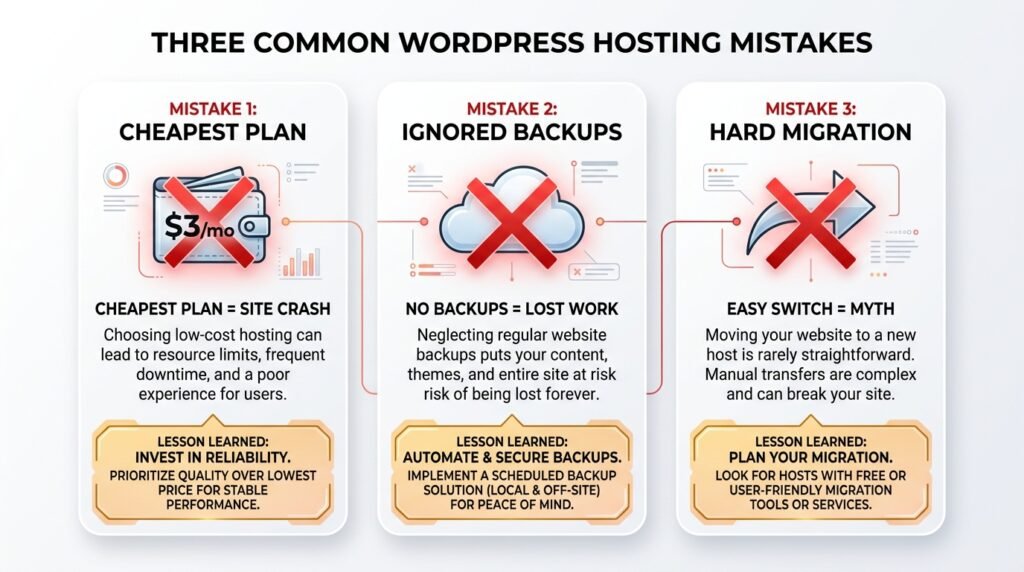
1. I bought the cheapest plan possible.
Saved $3/month. Then my site crashed during peak traffic — costing me a full day of lost revenue and a black eye on customer trust. As a result, I upgraded within 6 weeks.
2. I ignored backups.
Lost a week of work when a plugin update broke my site and I had no clean restore point. In practice, daily backups would have saved me 8 hours of rebuilding. Now I use UpdraftPlus (free) on every site.
3. I assumed I could switch hosts easily.
Moving a WordPress site is possible, but it’s a 4–6 hour job with real risks: broken permalinks, lost form entries, email deliverability issues. Because of this, I now recommend choosing right the first time — or paying a service like BlogVault ($89/year) to handle migration without downtime.
Frequently Asked Questions
Q1: Is managed WordPress hosting worth the extra cost?
Yes, if your site makes money. The $15–20/month premium buys server-level caching, daily backups, and WordPress-expert support. For a blog doing 5,000 visitors/month, shared is fine. However, for a store doing $5,000/month in sales, managed hosting pays for itself in a single recovered sale.
Q2: Can I migrate from shared to managed without losing SEO?
Yes — if you do it properly. Lower DNS TTL 24 hours before, test on a temporary URL, keep the old host for 7 days. Done right, you’ll see a temporary 5–10% dip for 1–2 weeks, then a permanent improvement.
Q3: What’s the cheapest way to host a WordPress site?
Namecheap shared hosting at **$1.98/month** (renewal $4.98). However, “cheapest” and “best value” aren’t the same — a $5/month SiteGround plan often delivers 2× the speed for the same money.
Q4: Does hosting affect SEO?
Yes, indirectly. Google uses Core Web Vitals (especially TTFB and LCP) as ranking signals. Slow hosting → worse Core Web Vitals → lower rankings → less traffic → less revenue. For ecommerce, this compounds fast. Track it in our WooCommerce Analytics & Reporting guide.
Q5: What if I’m on WooCommerce?
You need at least a VPS or managed WordPress plan. Shared hosting can technically run WooCommerce, but the checkout page will time out under load — losing you sales exactly when traffic spikes. Also, advanced shipping calculations need fast servers — see our WooCommerce Advanced Shipping guide.
Q6: How often should I review my hosting?
Every 6–12 months. Prices change, your traffic grows, and new hosts enter the market with better deals. Also, if you’ve hit 25,000+ visitors/month, it’s time to upgrade — don’t wait for a crash.
Q7: What plugins should I install on a new host?
Start with essentials only — see our Must-Have WordPress Plugins guide. Most managed hosts already include caching, security, and backups, so you can skip those plugins entirely.
Key Takeaways
- Shared hosting ($3–10/mo) = cheap but slow, best for beginners under 10,000 visitors/month
- VPS ($20–60/mo) = faster, more control, needs technical skills
- Managed WP ($15–100/mo) = fastest and easiest, required for WooCommerce and 25k+ traffic
- Renewal prices are 3–5× intro prices — always calculate your real 3-year cost
- 25,000 visitors/month is the tipping point where shared hosting starts losing you sales
- Never buy the absolute cheapest plan — it costs more in lost revenue than it saves
- Backups are non-negotiable — daily, tested, and stored off-site
- Choose right the first time — migration is possible, but a 4–6 hour job with real risks
Ready for the Next Step?
Now that you’ve picked a host, the next step is getting WordPress installed. But don’t worry — most hosts do it for you with one click.
I’ve tested 5 hosts personally. If you have questions about any specific one, leave a comment below — I read every one and I’ll tell you the truth.
Related Reading
- Install WordPress in 10 Minutes — the exact setup walkthrough
- Build a WordPress Homepage with Kadence — your first page, no code
- Why I Built My WordPress Site from Scratch — the honest beginner story
- How to Write Your First Blog Post — SEO basics for your first article
- How to Build an Email List from Day One — turn visitors into subscribers
- How to Get Your First 100 Readers — traffic sources that actually work