
Subscription‑based selling has quietly reshaped how WooCommerce stores grow, turning casual buyers into loyal, recurring customers.
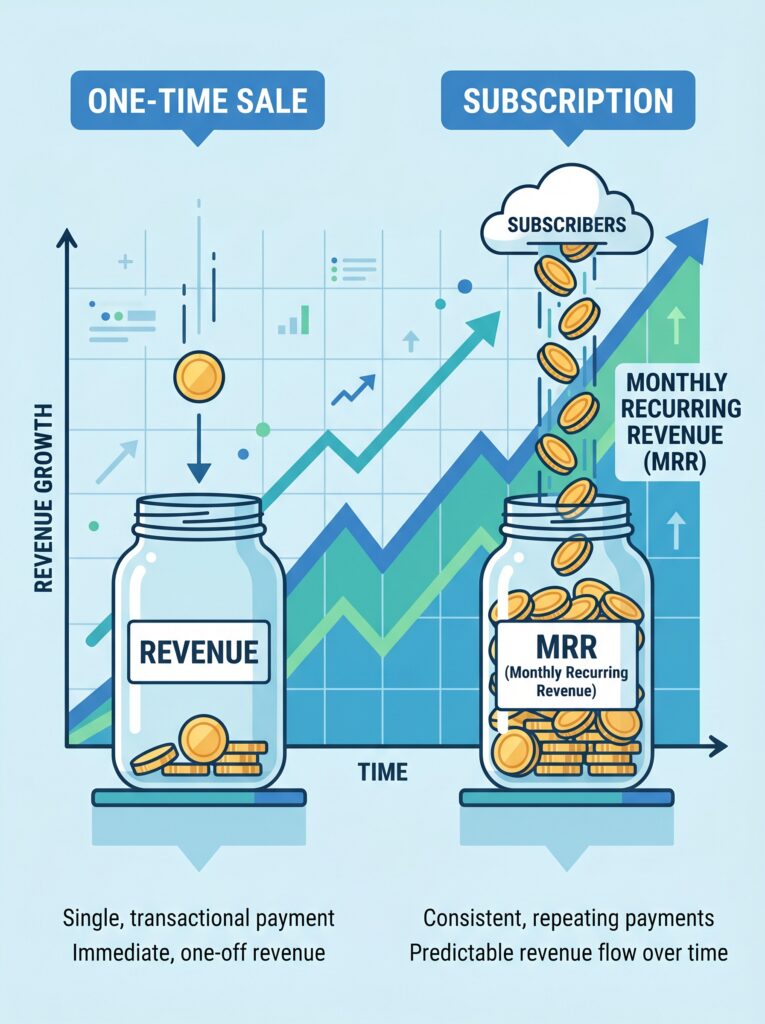
A one‑time sale generates revenue once. A subscription generates revenue every week, month, quarter or year for as long as the customer stays active. This predictable income stream fundamentally changes how you plan inventory, allocate marketing spend, and forecast growth. According to available market data, the subscription e‑commerce market has continued to grow at double‑digit rates, and businesses that master retention gain a significant competitive advantage.
However, the truth is that WooCommerce does not support subscription billing natively. To implement recurring payments, automated renewals, and subscription management, a dedicated plugin is essential. This guide walks you through everything: choosing the right plugin, configuring your first subscription product, setting up dunning management to recover failed payments, reducing customer churn, and measuring success. By the end, you’ll have a fully operational recurring‑revenue system on your WooCommerce store.
Let’s turn your store into a subscription powerhouse.
Part 1: Why Subscription Revenue Changes Everything
A store built on one‑time sales starts every month at zero. A subscription store starts the month already knowing most of its revenue. A buyer who stays for a year is worth many times more than one who buys once and leaves, even at a lower monthly price.
Benefits of recurring revenue
| Benefit | What it means for your store |
|---|---|
| Predictable cash flow | Stop guessing monthly revenue. Subscription customers provide a reliable baseline you can plan around. |
| Higher customer lifetime value | Subscription customers generate three to five times more revenue over their lifetime compared to one‑time buyers. |
| Lower dependence on constant customer acquisition | Each subscriber you retain reduces pressure on your marketing budget. |
| Easier scaling | When you know your monthly recurring revenue (MRR), you can confidently invest in paid ads, new product development, and hiring. |
If you’re planning to sell WordPress plugins, a subscription model is particularly attractive. Software customers often prefer predictable annual billing over one‑time purchases, and you benefit from steady, recurring income to fund ongoing development and support.
💡 Understanding the difference between billing‑first and access‑control‑first plugins saves you from buying tools that don’t match your business model. Subscription plugins handle billing logic, renewals and payment failures. Membership plugins control access to content and downloads based on subscription status. For selling WordPress plugins, you primarily need a billing‑first subscription plugin.
Part 2: Choosing Your WooCommerce Subscription Plugin
The market for WooCommerce subscription plugins has matured considerably. You have multiple excellent options at different price points and feature levels.
Detailed plugin comparison
| Plugin | Starting price | Free version | Key strengths | Best for |
|---|---|---|---|---|
| Flexible Subscriptions | Free (core) / paid add‑ons | Yes (full) | Lightweight, works with new checkout block, multiple add‑ons for extra features | Beginners, budget‑conscious stores |
| ArraySubs | Free (full) | Yes (all features) | Complete bundle: subscriptions + membership + retention flow builder | Stores needing membership too |
| WPSubscription | Free / from $89/year | Yes | Modern, lightweight, includes split payments, delivery scheduling, REST API | Independent stores wanting value |
| YITH WooCommerce Subscription | Free (basic) / $199/year | Yes (limited) | Part of large YITH ecosystem, advanced coupon system, analytics dashboard | Stores already using YITH plugins |
| WooCommerce Subscriptions | $279/year | No | Native Woo support, most feature‑complete, deepest gateway compatibility | Enterprise‑scale stores requiring maximum reliability |
WooCommerce Subscriptions (by Woo / Automattic) has been on the market since 2013 and powers hundreds of thousands of stores. It is the gold standard in terms of feature depth and third‑party integration support. It supports variable subscriptions, free trials, sign‑up fees, synchronised renewals, and full subscriber account management. The key trade‑off: it is the most expensive option and, in some configurations, has the heaviest performance footprint. However, for a growing store, the investment often pays for itself quickly through recovered revenue.
Flexible Subscriptions (by WPDesk) has been updated to fully support the new WooCommerce block checkout, making it a modern, compatible choice that will not break with future WooCommerce updates. Its paid add‑ons (Recurring Shipping, Payment Retry, Stock Management, API Integration) allow you to add functionality as your store grows without paying for features you do not yet need.
ArraySubs is a newer free alternative that bundles features usually locked behind paywalls in other plugins: membership access control, retention flows, member discounts and customer self‑service are all included in the free version. It also offers a built‑in retention flow builder, plan switching with proration, two‑phase grace periods, and over 40 report links in its analytics hub. If your store requires both subscriptions and membership access control and you prefer to avoid piecing together multiple plugins, this is a strong candidate.
💡 If you are just starting, Flexible Subscriptions (free core) or ArraySubs (completely free) let you test subscription sales with zero upfront investment. When your store grows, you can migrate to a paid solution or upgrade within your chosen plugin.
Part 3: Creating Your First Subscription Product – Step by Step
Once your subscription plugin is installed and activated, adding a subscription product is straightforward. The exact steps vary slightly between plugins, but the core process is consistent. Let’s use WooCommerce Subscriptions as our reference, as it provides the most complete feature set.
Step 1: Install and configure your subscription plugin
- Purchase and download your chosen plugin.
- In your WordPress dashboard, go to Plugins → Add New → Upload Plugin.
- Upload the ZIP file, install and activate it.
- Navigate to WooCommerce → Settings → Subscriptions to configure the basics:
| Setting | Recommended value | Why |
|---|---|---|
| Button Text | “Subscribe Now” or “Start Your Plan” | Clear CTA improves conversion |
| Role assignment | Subscriber → Active Subscriber | Assigns roles based on subscription status |
| Failed payment retry | Enable, 5 retries over 14 days | Recovers revenue from temporary card failures |
| Subscription suspension | Enable | Giving customers a pause option reduces outright cancellations |
Step 2: Add a new subscription product
- Go to Products → Add New.
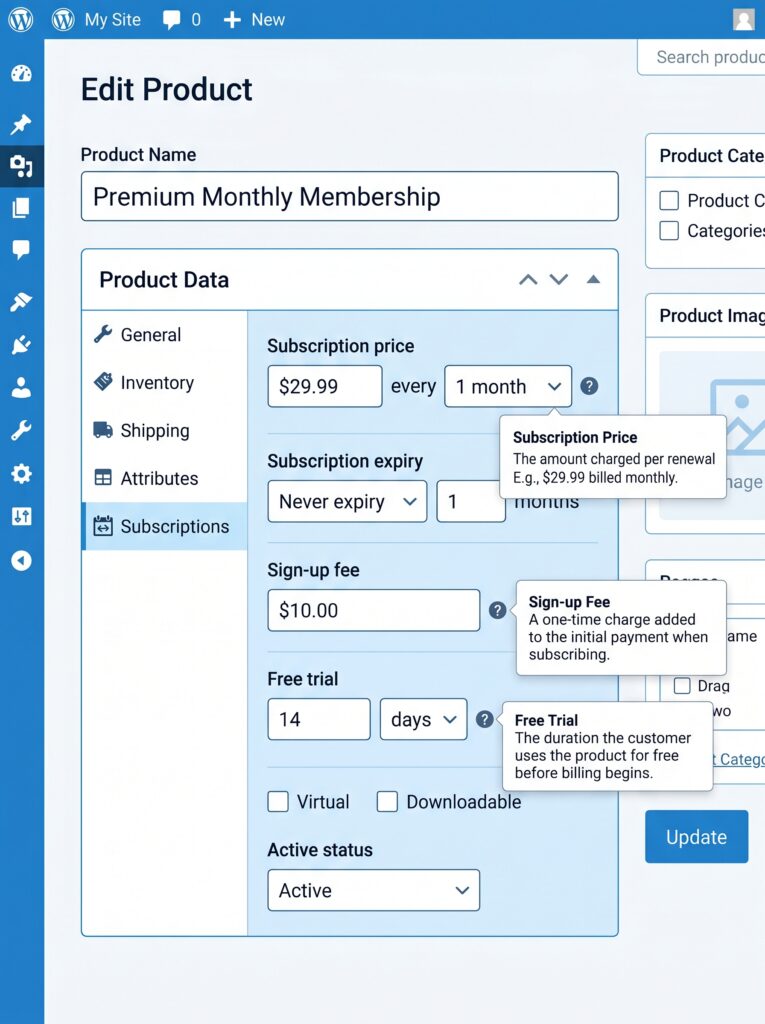
- In the Product Data dropdown, select “Simple subscription” (or “Variable subscription” if you need different pricing tiers).
- Configure the subscription details:
| Field | What to enter |
|---|---|
| Subscription price | Base recurring amount (e.g., $29.99) |
| Subscription period | Daily, weekly, monthly, quarterly, yearly, or custom interval |
| Free trial | Optional: number of days/weeks before first payment |
| Sign‑up fee | Optional: one‑time upfront charge |
| Expiration | Optional: limit total subscription duration (e.g., 12 months) |
For a variable subscription (different tiers), create an attribute (e.g., “Plan”), add values (“Starter”, “Pro”, “Enterprise”), and generate variations. Each variation can have its own price, trial period, and sign‑up fee.
Step 3: Publish and test
Click Publish. Your subscription product is now live. Always place a test order using your payment gateway’s sandbox mode before promoting it to real customers.
💡 For digital products like plugins, enable the Virtual checkbox in the product data panel. This removes shipping fields and ensures the order is marked “Completed” immediately after payment, triggering subscription activation without manual intervention.
Part 4: Subscription Pricing Strategies That Convert
Setting the right price for your subscription product is a blend of art and science. Avoid these common mistakes.
Three effective pricing models for plugin sellers
| Model | How it works | When it works best |
|---|---|---|
| Freemium | Free version with limited features; upgrade to premium subscription | Low marginal cost products (software, digital). Let users try before they buy. |
| Tiered pricing | Multiple plans (Starter, Pro, Enterprise) with increasing features and prices | Value can be scaled logically. Different customers need different feature sets. |
| Annual vs monthly | Offer both. Annual plans usually discounted (e.g., $240/year vs $300/year month‑to‑month) | Annual subscribers are 2.4x more profitable and generate significantly higher lifetime value. |
💡 Businesses pushing longer commitments see far lower churn than those stuck on monthly‑only plans. Acquiring a new customer can cost five to twenty‑five times more than keeping one you already have.
How to present pricing tiers in WooCommerce
Use variable subscription products to offer different tiers. For example:
| Plan | Price | Features |
|---|---|---|
| Starter | $9/month | Basic features, 1 site |
| Pro | $29/month | Full features, 5 sites |
| Enterprise | $99/month | Full features + priority support, unlimited sites |
Each tier gets its own variation with separate price and subscription period settings. Display them side‑by‑side on the product page using a product gallery layout or a dedicated plugin like Product Table for WooCommerce.
Part 5: Managing Failed Payments – Dunning Management is Critical
Here is the reality that most store owners ignore: between 68% and 40% of subscription churn happens due to failed payments, not customer dissatisfaction. Expired credit cards, insufficient funds, and fraud blocks are the primary culprits.
Most of these failures are recoverable. Between 20% and 40% of failed payments can be successfully recovered with a proper dunning system, yet many WooCommerce store owners never attempt recovery at all.
Building an effective dunning process
Dunning is the automated process of retrying failed payments and notifying customers before their subscription expires. A proper dunning system includes:
| Component | Action |
|---|---|
| Automatic retries | Retry failed payments 3–5 times over 14 days, with increasing intervals (e.g., 1 hour, 6 hours, 24 hours, 5 days, 14 days) |
| Pre‑expiry notifications | Email the customer 7 days before a card expires, with a direct link to update billing information |
| Post‑failure notifications | Send a friendly email after first failure: “Your payment could not be processed. Please update your payment details.” |
| Final notice | Before cancellation, send a last chance email with a one‑click link to update the payment method |
How to implement dunning in WooCommerce
Most subscription plugins include basic dunning management.
- WooCommerce Subscriptions: Built‑in retry system with configurable retry rules per subscription.
- Flexible Subscriptions Payment Retry add‑on: Adds automatic retries and email notifications after failed payments.
- ArraySubs: Built‑in two‑phase grace periods (active grace and on‑hold grace) before cancellation.
💡 The single most effective way to reduce involuntary churn is to let customers update their payment details without leaving your site. Place a direct link in your dunning emails pointing to the “Payment Methods” section of their My Account page.
Part 6: Reducing Voluntary Churn – Keeping Subscribers Engaged
Voluntary churn – when a customer actively chooses to cancel – accounts for the remaining portion of churn. Strategies to reduce it fall into three buckets.
Offer annual plans
Annual subscribers stay significantly longer than monthly subscribers. If you sell plugins, offer both options and encourage the annual commitment through a discount (e.g., pay for 10 months, get 12). The locked‑in time reduces the window during which a customer can “forget” why they subscribed.
Implement cancellation retention offers
When a customer clicks “Cancel”, do not let them go without an offer. A well‑timed retention offer (e.g., “We’ll give you 50% off your next two months”) can save a significant portion of cancellations. According to industry research, customers who accept retention offers stay longer on average, turning a lost sale into continued revenue.
Retention offer best practices:
- Present the offer before finalising cancellation, not after.
- Offer meaningful value (30–50% discount for 2–3 months).
- Ensure the customer understands it is a limited‑time discount, not a permanent price reduction.
WooCommerce plugin options:
- ArraySubs: Built‑in retention flow builder with four retention offer types and save‑rate analytics.
- Recurio: AI‑powered churn prediction to identify at‑risk subscribers before they cancel, with predictive accuracy of around 82%.
Reduce friction with self‑service tools
A subscriber who must email you to swap a credit card or change a plan is a churn risk. A clean self‑service dashboard is a churn prevention tool.
Enable customers to:
- Update payment details directly
- Pause or cancel their subscription without contacting support
- Upgrade or downgrade their plan (with prorated billing)
- View invoice history
- Skip a renewal (e.g., vacation mode)
Most modern subscription plugins include self‑service dashboards. ArraySubs, WPSubscription, and WooCommerce Subscriptions all provide customer portals inside WooCommerce’s My Account area.
Part 7: Measuring Your Subscription Performance
You cannot improve what you do not measure. Tracking the right metrics is essential.
Key subscription metrics
| Metric | What it tells you | Formula |
|---|---|---|
| Monthly Recurring Revenue (MRR) | Predictable baseline income each month | Sum of all active subscription amounts |
| Customer Lifetime Value (CLV) | Total revenue expected from a single customer | (Average monthly revenue × average customer lifespan in months) |
| Churn rate | Percentage of customers lost each month | (Customers lost during month ÷ total customers at start) × 100 |
| Average Revenue Per User (ARPU) | Revenue efficiency across your subscriber base | Total MRR ÷ total active subscribers |
| LTV/CAC ratio | Health of acquisition vs retention | Lifetime Value ÷ Customer Acquisition Cost (healthy target: 3:1 or higher) |
💡 A store with 1,000 customers paying $100 monthly loses over $50,000 in preventable revenue over 18 months at average churn rates. A reduction in monthly churn from 5% to 3% can triple customer lifespan, from roughly 17 months to over 50 months.
Where to find these metrics
- WooCommerce Subscriptions: Advanced reporting under Subscriptions → Reports (revenue, churn, renewal rates).
- ArraySubs: Built‑in reports hub with 40+ report links across 12 categories and 8 retention KPI cards.
- Recurio: Real‑time KPIs, cohort analysis, LTV calculations, churn monitoring.
Regular review cadence
- Daily: Check failed payment queue. Process any urgent retries.
- Weekly: Review MRR, churn rate, renewal success rate.
- Monthly: Analyse LTV/CAC ratio. Compare month‑over‑month performance.
- Quarterly: Audit pricing strategy. Run retention offer experiments.
What’s Next?
You now have a complete subscription system: plugin selection, product setup, dunning management, churn reduction and performance measurement. Your store is ready to generate predictable, recurring revenue.
👉 Next article in this series: Google Listings & Ads for WooCommerce – Selling Your Products Across Google
We’ll cover how to synchronise your WooCommerce products with Google Merchant Center, create product listing ads, and track performance – all from within your WordPress dashboard.
Do you already sell subscriptions, or are you planning to add them? Which pricing model appeals to you most – freemium, tiered pricing, or annual plans? Let me know in the comments.
📌 Key Takeaways (for skimmers)
- WooCommerce does not natively support subscriptions. A dedicated plugin is essential.
- Best free plugin to start: Flexible Subscriptions (core free) or ArraySubs (fully free, includes membership and retention features).
- Best premium option for scaling stores: WooCommerce Subscriptions ($279/year) – most feature‑complete, deepest gateway compatibility, gold standard since 2013.
- Subscription products are created as “Simple subscription” or “Variable subscription” product types, with configurable billing cycles, free trials, sign‑up fees and expiration dates.
- Offer annual plans. Annual subscribers are 2.4x more profitable and stay significantly longer.
- 68% of subscription churn is involuntary (failed payments). Implement dunning management: automatic retries, pre‑expiry notifications, and a direct link for customers to update payment details.
- Reduce voluntary churn with cancellation retention offers (30–50% discount for 2–3 months) and a self‑service dashboard.
- Track essential metrics: MRR, CLV, churn rate, ARPU, LTV/CAC ratio. Review weekly and monthly.
🔗 Internal Links
- Article #1 – WooCommerce in 2026 – Market Share & Trends
- Article #2 – Installing WooCommerce & Setup Wizard
- Article #3 – Adding Your First Product
- Article #4 – License Keys for WooCommerce
- Article #5 – Optimising Checkout for Digital Products
- Article #6 – Abandoned Cart Recovery
- Article #7 – Managing Orders & Customers with HPOS
- Article #8 – Marketing & Promotions
- You are here – Recurring Revenue & Subscriptions
- Article #10 – Google Listings & Ads for WooCommerce (coming soon)