
WooCommerce abandoned cart recovery turns lost checkouts into completed orders. Roughly 70% of shoppers add items to their cart and leave — but you can win back 5–15% of them with automated emails, exit-intent popups, and smart discounts.
The best free plugin is Retainful — it captures guest carts, sends unlimited emails, and generates unique discount codes. For exit-intent popups, Hustle (also free) captures emails before visitors leave.
But here’s the good news: you can win many of them back. With a simple abandoned cart recovery system, you can reclaim a double‑digit percentage of those lost sales.
This guide covers:
- Why customers abandon — the 6 reasons and what you can fix
- Best plugins for 2026 — Retainful, CartFlows, AutomateWoo, and more
- The 3-email sequence — 1 hour, 24 hours, 72 hours (with templates)
- Exit-intent popups — capturing emails before they leave
- Discount strategy — when to offer, how much, and how to avoid training customers
- Tracking recovery rate — metrics that matter and A/B testing
- Advanced tactics — SMS, retargeting, live chat
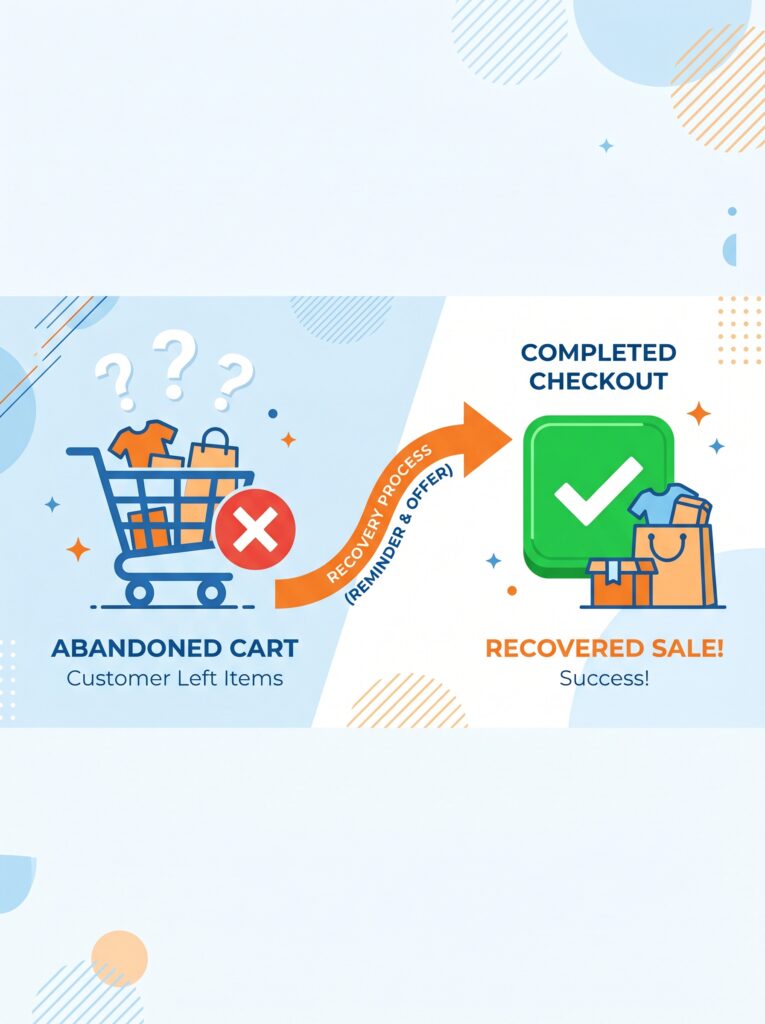
No magic. Just proven tactics that work for digital product stores (like plugins) and physical goods alike.
Let’s turn abandoned carts into completed orders.
Part 1: Why Customers Abandon Carts (and What You Can Do)
You can’t fix a problem you don’t understand. According to e‑commerce industry studies, the top reasons for cart abandonment include:
| Reason | % of abandonments | What you can do |
|---|---|---|
| Unexpected costs (shipping, taxes, fees) | ~50% | Show costs early; offer free shipping thresholds |
| Forced account creation | ~25% | Enable guest checkout (we did this in Article 5) |
| Too long / complicated checkout | ~20% | Remove unnecessary fields (also from Article 5) |
| Payment security concerns | ~15% | Add trust badges and SSL certificate |
| Comparison shopping | ~15% | You can’t prevent this, but you can recover with follow‑up emails |
| Just browsing / not ready | ~40% | Capture email and nurture over time |
For digital products (like your WordPress plugins), unexpected costs are usually lower (no shipping), but “just browsing” and “comparison shopping” are common. People evaluate multiple plugins, leave your site, and may forget to return.
That’s where abandoned cart recovery emails work best: a gentle reminder that brings you back to the top of their mind.
💡 *The good news: abandoned cart emails have an average open rate of around 45% and a click‑through rate near 20%. Of the people who click, about half complete the purchase. That means if 100 people abandon carts, you might recover 9-10 sales just with a simple email sequence.*
Part 2: Setting Up Automated Abandoned Cart Emails
WooCommerce does not include abandoned cart recovery out of the box. You need a plugin. Fortunately, excellent free and paid options exist.
Best plugins for abandoned cart recovery (2026)
| Plugin | Free version | Best feature |
|---|---|---|
| AutomateWoo (by Woo) | No (starts $10/mo) | Full automation suite – carts, follow‑ups, birthdays, reviews |
| Cart Abandonment Recovery (by CartFlows) | Yes (limited) | Free version supports emails up to 1,000 carts/month |
| Retainful | Yes | Unlimited emails, coupons, analytics; paid adds SMS and advanced rules |
| Abandoned Cart Lite (by Tyche Softwares) | Yes | Manual or automatic emails; guest cart capture via “Save for later” |
| YITH WooCommerce Recover Abandoned Cart | Yes (premium upgrades) | SMS, tracking, coupon integration |
My recommendation for beginners: Retainful (free) – it’s feature‑rich, actively maintained, and integrates with popular email marketing services (Mailchimp, ConvertKit, etc.) if you want to send via your own ESP.
Step‑by‑step: Installing and configuring Retainful
- Go to Plugins → Add New, search for “Retainful”, install and activate.
- After activation, Retainful adds a new menu item: Retainful → Dashboard.
- Run the setup wizard:
- Enable cart tracking (it adds a small script to your site – safe).
- Choose your email sending method: either via WooCommerce (default) or via your own email marketing service (recommended for better deliverability).
- Set the time delay for the first email (e.g., 1 hour after abandonment).
- Create your email templates (I’ll cover content in Part 3).
The plugin automatically tracks guest carts (no login required) by storing a session cookie. When a customer returns and completes the purchase, the system cancels any pending followup emails automatically – no double‑sending.
Other plugins approach (CartFlows)
CartFlows offers a different philosophy: instead of email‑only, it provides a whole checkout flow optimisation suite. Its Cart Abandonment Recovery module (free) captures emails via a “Save for later” popup at checkout. It’s excellent if you also want to build one‑click upsells and order bumps.
For most digital sellers, Retainful is the simpler starting point.
Part 3: Crafting Emails That Actually Convert
The email content matters as much as the automation. A boring “You forgot something” email gets ignored. A helpful, personalised, slightly urgent email gets clicks.
The three‑email sequence (proven structure)
Most successful stores send a sequence of 2-3 emails, not just one.
| Email # | Timing | Tone | Content |
|---|---|---|---|
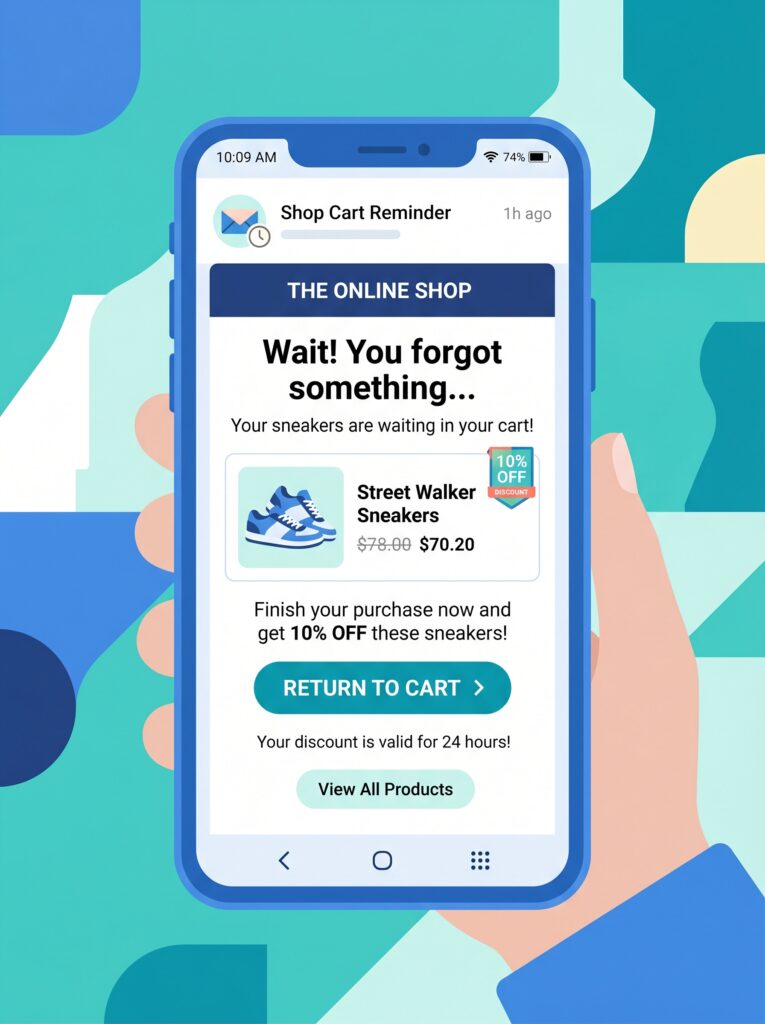
| 1 | 1 hour after abandonment | Helpful, low pressure | “Hey, you left this in your cart. No rush – but here’s a link to complete your purchase.” Include product image and a clear “Return to cart” button. |
| 2 | 24 hours later | Slightly more urgent | “Did you change your mind? Your cart is still available.” Add a customer testimonial or highlight a key feature (e.g., “Trusted by 500+ developers”). |
| 3 | 72 hours later | Last chance | “Your cart expires soon.” Offer a small incentive (e.g., 10% off) if you’re comfortable. But test without discount first – many people just need a reminder, not a discount. |
💡 For digital products, you don’t have “stock limits” in the same way, but you can create urgency with a limited‑time discount code. Use sparingly to avoid training customers to abandon carts intentionally.
Subject lines that work (examples)
- “Your cart is waiting for you at [Site Name]”
- “Did you forget something?”
- “Complete your purchase in one click”
- “Still interested in [Product Name]?”
- “⏳ Your cart expires in 24 hours”
Avoid spam triggers like “FREE” in all caps or excessive exclamation marks. Keep subject lines under 50 characters for better mobile display.
Personalisation tokens
Retainful (and other plugins) allows you to insert dynamic tokens:
{{customer.first_name}}– personalizes the greeting.{{cart.items}}– lists the abandoned items.{{cart.link}}– unique one‑click link to return to cart (no login required for guest carts).
Example email template (Retainful syntax)
Subject: Your cart at {{site.title}} is waiting
Body:
Hi {{customer.first_name}},
You recently added {{cart.items}} to your cart but didn’t complete the purchase. No problem – it happens.
Your cart is still saved. You can complete your order in one click:
👉 {{cart.link}}
If you ran into any issues, just reply to this email – I’ll personally help.
Best,
{{site.title}} Team
Part 4: Exit‑Intent Popups – Capture Emails Before They Leave
Exit‑intent technology detects when a user’s mouse moves toward the browser’s close button or address bar. At that precise moment, you can show a popup offering a discount or a lead magnet in exchange for their email address.
This is different from abandoned cart emails: exit‑intent captures the email before they leave, while abandoned cart emails capture it after they’ve already left. Both are valuable.
Best free plugins for exit‑intent popups
| Plugin | Free tier | Key features |
|---|---|---|
| OptinMonster | No (paid only) | Very advanced, but paid |
| Hustle (by WPMU DEV) | Yes | Exit‑intent, slide‑ins, popups, embeddable – completely free |
| MailOptin | Yes (lite) | Exit‑intent in pro only; lite has less targeting |
| Popup Maker | Yes | Exit‑intent triggers available with free version via “Advanced Targeting Conditions” |
| ConvertBox | Paid | Not free, but high quality |
My recommendation: Hustle – 100% free, no premium upgrade, includes exit‑intent, slide‑ins, and multiple display rules. It integrates with major email marketing services (Mailchimp, ConvertKit, ActiveCampaign, etc.) and with WooCommerce (show popups only on cart/checkout pages).
Setting up Hustle for cart abandonment
- Install and activate Hustle (Plugins → Add New → search “Hustle”).
- Go to Hustle → Popups → Create New.
- Choose a template or start blank.
- Under Visibility:
- Select “Show on specific URL(s)” and add
/cart/and/checkout/(your cart and checkout page slugs). - Under Conditions, set “Show when” to “Visitor is about to leave the page” (exit‑intent).
- Select “Show on specific URL(s)” and add
- Design your popup: headline (“Wait! Get 10% off your order”), subhead (“Enter your email to save your cart and get a discount code”), email field, submit button.
- Connect Hustle to your email marketing service (or simply collect emails and export later).
- Publish.
When a visitor moves to close the tab, the popup appears. If they enter their email, you can send them a discount code immediately (via automation in your email service) and also add them to your abandoned cart sequence.
💡 Exit‑intent popups are effective but can be annoying if overused. Limit them to cart and checkout pages only – not every page of your site.
Part 5: Offering Discounts – When and How Much
The big question: should you offer a discount in your recovery emails? The answer depends on your margins and your audience.
Arguments for discounts
- They work – discount emails convert at higher rates.
- For first‑time buyers, a small discount can tip the scale.
- Limited‑time urgency (e.g., “10% off valid for 24h”) accelerates action.
Arguments against discounts
- You train customers to abandon carts intentionally to get a discount next time.
- Reduces your effective revenue.
- For digital products, margins can be high enough to absorb occasional discounts.
A balanced approach (recommended)
- Do not offer a discount in the first email. Just remind them.
- In the second email, offer a discount only if the cart value is above a threshold (e.g., $50).
- In the third email (72 hours), offer a small discount (5‑10%) with a short expiration (24h).
How to generate unique discount codes automatically
Retainful (free) includes a coupon generation feature. Under Retainful → Abandoned Carts → Settings → Coupons, you can enable auto‑generation of unique discount codes per abandoned cart. The code is personalised and expires after a set number of days.
Alternatively, you can create a standard coupon in WooCommerce → Coupons → Add New and use it in your emails. However, a generic code (like “SAVE10”) may leak to coupon sharing sites. Unique codes per customer are more controlled.
Part 6: Tracking and Measuring Recovery Performance
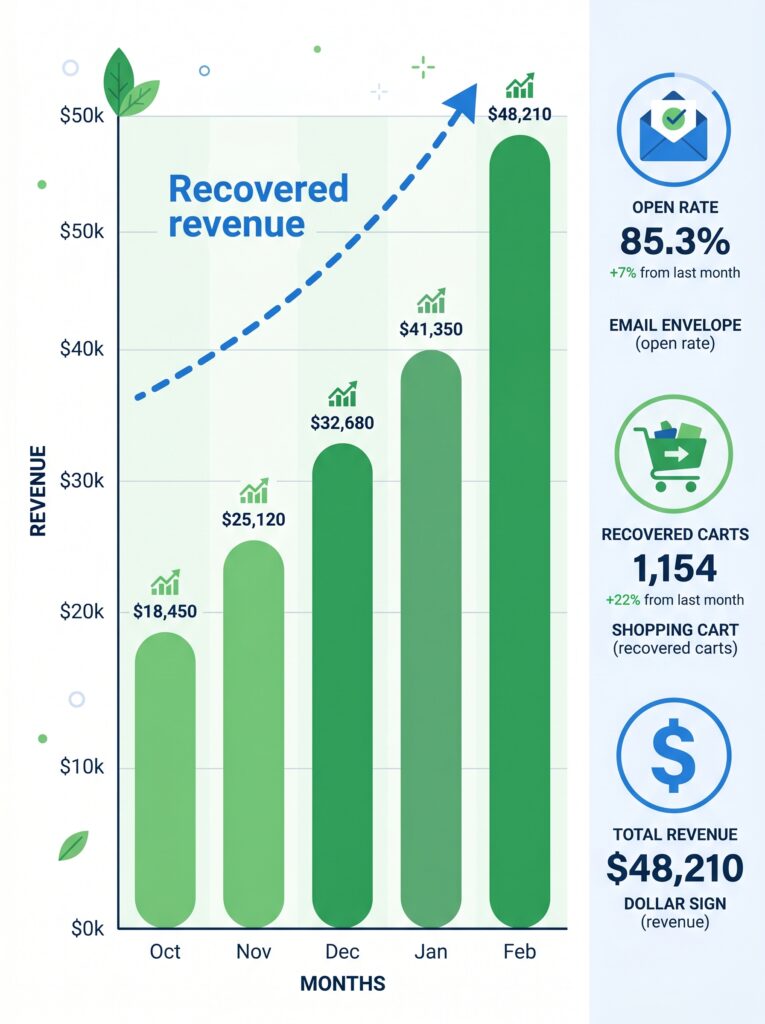
You can’t improve what you don’t measure. Abandoned cart plugins provide dashboards, but here are the key metrics to monitor.
| Metric | What it means | Good target |
|---|---|---|
| Abandoned carts | Number of carts not completed within your defined window (e.g., 1 hour) | Depends on traffic |
| Recovered carts | Carts that were abandoned but later completed after a recovery email | 5–15% of abandoned carts is realistic |
| Recovery revenue | Total value of recovered carts | As high as possible |
| Email open rate | % of recipients who opened your email | 40–50% |
| Email click‑through rate | % of opens that clicked the “Return to cart” link | 15–25% |
| Coupon usage rate | % of recipients who used a discount code | 10–20% of recovered carts |
Where to find these metrics
- Retainful: Dashboard → Analytics shows abandoned carts, recovered carts, revenue recovered, and email performance.
- WooCommerce → Analytics → Recovered Carts (if using AutomateWoo or compatible plugin).
- Google Analytics (if you set up enhanced e‑commerce tracking) can show checkout funnel drop‑off points.
A/B testing your emails
Run simple A/B tests to improve your recovery rate:
- Subject line A vs Subject line B – which gets higher open rates?
- Discount offer A (5% off) vs Discount offer B (free shipping for digital? maybe not applicable) – which generates more revenue net of discount?
- Single email vs two‑email sequence – do more emails annoy or recover more?
Most email plugins (including Retainful) don’t have built‑in A/B testing for free; you can manually alternate every two weeks or upgrade to paid versions like AutomateWoo.
Part 7: Advanced Tactics (Optional)
Once you have basic recovery emails working, consider these advanced strategies.
1. SMS recovery messages
Some plugins (AutomateWoo, Retainful Pro) support SMS sending to customers who provided a phone number. SMS open rates are near 98% but are more intrusive. Use only for high‑value carts (>$100) and only if the customer opted in.
2. Retargeting ads
You can use the Facebook Pixel or Google Remarketing Tag to show ads to people who visited your cart page but didn’t purchase. This works well even if you don’t have their email. Install a plugin like PixelYourSite (free) to add the pixel, then create a retargeting campaign in Facebook Ads showing your product.
3. Live chat recovery
Add a live chat widget (e.g., Tidio, free) that proactively offers help when a user spends more than 30 seconds on the cart page. Sometimes people have a simple question (“Does this work with PHP 8.2?”). Answering it in real time can close the sale.
4. Cart expiration notice on site
Use a small notice on the cart page: “Your cart items are reserved for 30 minutes.” This creates a subtle urgency without being pushy. Some plugins (like Cart Notices for WooCommerce) can add this.
5. Post‑recovery survey
When a customer returns and completes a purchase after receiving a recovery email, ask a simple survey: “What almost stopped you from buying?” The answers will reveal hidden friction points.
Part 8: Common Mistakes (And How to Avoid Them)
| Mistake | Consequence | Fix |
|---|---|---|
| Sending only one email | Misses customers who need multiple reminders | Use a 3‑email sequence (1h, 24h, 72h) |
| Email goes to spam | Zero open rate | Use an SMTP plugin (like WP Mail SMTP) to send via authenticated email service (SendGrid, Mailgun, etc.) |
| Discount too high | Trains customers to abandon carts | Start with no discount, add small (5‑10%) only in later emails |
| No guest cart capture | Unable to email customers who didn’t create an account | Ensure guest cart tracking is enabled in your plugin (Retainful does this automatically) |
| Ignoring mobile design | Emails look broken on phones | Test on mobile; use single‑column layouts and large buttons |
| Not cancelling emails after purchase | Angry customers get recovery email after they already bought | Abandoned cart plugins automatically cancel pending emails upon completion – verify it works |
What’s Next?
You now have a full abandoned cart recovery system – emails, exit‑intent popups, discounts, and analytics. The next step is to manage your customers and orders efficiently.
👉 Next article in this series: Managing Orders & Customers with HPOS – The High‑Performance Order Storage Explained
We’ll cover how WooCommerce’s modern order system works (HPOS), how to navigate orders, process refunds, and manage customer accounts – all optimised for speed.
What’s your biggest challenge with cart abandonment? Do you already use recovery emails? Let me know in the comments – I’d love to help you optimise.
📌 Key Takeaways (for skimmers)
- 70% of carts are abandoned – but you can recover 5–15% with automated emails.
- Top reasons: unexpected costs (less for digital), forced account creation, complicated checkout, and “just browsing”.
- Best free recovery plugin: Retainful – unlimited emails, coupons, guest cart tracking.
- Email sequence: 1 hour (reminder) → 24 hours (slight urgency) → 72 hours (last chance + optional discount).
- Subject lines under 50 characters, personalisation tokens, clear “Return to cart” button.
- Exit‑intent popups capture emails before they leave – use Hustle (free) on cart/checkout pages only.
- Discounts should be used sparingly; start with no discount, add small offers in later emails.
- Track metrics: abandoned carts, recovered carts, revenue recovered, open rate, click‑through rate.
- Advanced: SMS recovery, retargeting ads, live chat, post‑purchase surveys.
- Avoid mistakes: use SMTP for deliverability, test mobile design, ensure guest tracking works.
🔗 Internal Links
- Article #1 – WooCommerce in 2026 – Market Share & Trends
- Article #2 – Installing WooCommerce & Setup Wizard
- Article #3 – Adding Your First Product
- Article #4 – License Keys for WooCommerce
- Article #5 – Optimising Checkout for Digital Products
- You are here – Abandoned Cart Recovery
- Article #7 – Managing Orders & Customers with HPOS (coming soon)