EasyWPKit Content Lock is a free WordPress Gutenberg block that lets you hide any content — text, images, videos, or entire sections — behind a payment link or a user role. Whether you want to sell digital products, accept donations, or build a members-only area, this plugin gives you everything you need without writing a single line of code.
However, there’s an important distinction between the free and Pro versions. First, the free version locks content using user roles only — perfect for membership sites, private forums, and premium content previews. Then, the Pro version adds payment-based locking via Stripe, PayPal, and WooCommerce, plus advanced styling and tracking.
What this guide covers:
- What EasyWPKit Content Lock does — free vs Pro features
- Example 1: Selling a digital download with Stripe/PayPal (Pro)
- Example 2: Building a members-only area with roles (Free)
- Example 3: Combining payment and roles (Pro)
- Bonus: Shortcode usage for Classic Editor
- How to install — from WordPress dashboard
- What Pro adds — WooCommerce integration, statistics, email notifications
Let’s turn your WordPress site into a content-locking machine.
What Is EasyWPKit Content Lock?
First, EasyWPKit Content Lock is a Gutenberg block plugin that lets you restrict access to any part of your content. Then, it works in two ways: by user role (free) or by payment (Pro). Finally, it integrates seamlessly with the WordPress block editor — no coding required.
Free vs Pro: What’s the Difference?
| Feature | Free | Pro |
|---|---|---|
| Lock by user role | ✅ Yes | ✅ Yes |
| Lock by payment (Stripe/PayPal) | ❌ No | ✅ Yes |
| WooCommerce integration | ❌ No | ✅ Yes |
| Automatic payment return handling | ❌ No | ✅ Yes |
| Unlock statistics | ❌ No | ✅ Yes |
| Email notifications | ❌ No | ✅ Yes |
| Advanced styling (16 presets, animations) | ❌ No | ✅ Yes |
| Classic Editor shortcode | ✅ Yes | ✅ Yes |
| Unlimited blocks, unlimited sites | ✅ Yes | ✅ Yes |
In practice, the free version is enough for membership sites and role-based access. However, if you want to sell content directly (ebooks, courses, premium tutorials), you’ll need Pro.
For a deeper look at selling digital products, see our How to Monetize Your WordPress Blog guide.
Example 1: Selling a Digital Download with Stripe or PayPal (Pro)
First, imagine you sell an ebook or a premium tutorial. Then, you want visitors to pay before they can read it. Here’s how EasyWPKit Content Lock Pro makes this work.
Step 1: Create a payment link
- Log in to your Stripe account (or PayPal)
- Create a Payment Link for your product
- Leave the “Redirect after payment” field empty for now — you’ll fill it in later
Step 2: Add the Content Lock block
- In the WordPress editor, click + → search for “Content Lock”
- Add the block to your page or post
Step 3: Configure lock settings
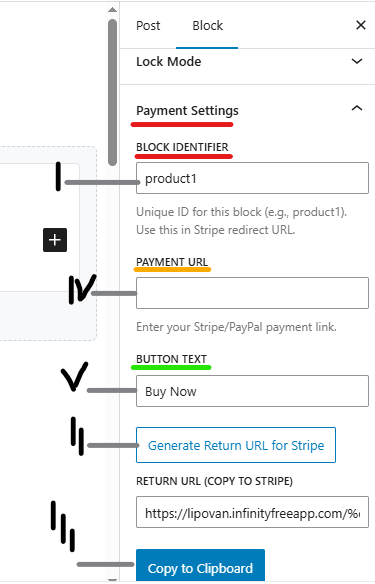
- Set Lock Mode to “Payment Only”
- Give it a unique Block Identifier (e.g.,
ebook_download) - Paste your Stripe/PayPal link into the Payment URL field
- Click “Generate Return URL for Stripe” — copy the generated URL
- Go back to your Stripe/PayPal settings and paste this URL into the redirect field
Step 4: Set up the payment handler page
- Create a new page with the shortcode:
[ewpkcl_payment_handler] - Publish the page
- Copy its URL
- Go to Content Lock → Settings and enter the page URL
How it works
First, a visitor clicks the “Buy Now” button. Then, they’re taken to Stripe/PayPal to complete payment. Finally, they’re automatically redirected back to your content — which unlocks instantly.
As a result, there’s no manual confirmation, no emails, no delay. The visitor pays and gets instant access.
Example 2: Building a Members-Only Area with User Roles (Free)
First, suppose you run a membership site. Then, you want to show exclusive content only to users with the role “Premium Member”. The free version handles this perfectly.
Step 1: Set up user roles
- Make sure your users have the correct role
- If you need a custom role (e.g., “Premium”), use a free plugin like User Role Editor
Step 2: Add the Content Lock block
- In the WordPress editor, insert an EasyWPKit Content Lock block
- Set Lock Mode to “Roles Only”
Step 3: Configure allowed roles
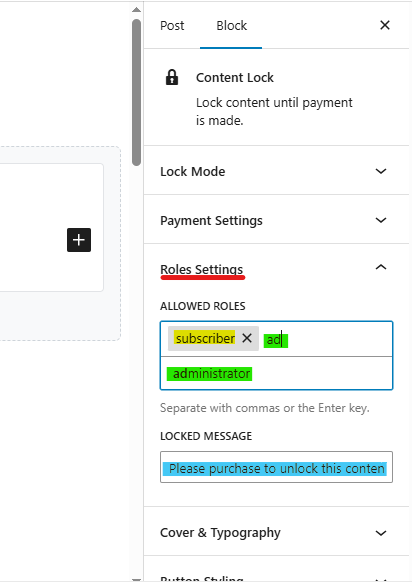
- In the Allowed Roles field, type the role ID (e.g.,
premium) - Select it from the suggestions
- Optionally, customize the message shown to unauthorized visitors (e.g., “Only premium members can view this content.”)
Step 4: Publish the page
First, logged-in users with the “Premium” role will see the hidden content immediately. Then, everyone else will see the locked message. As a result, no payment, no clicks — fully automatic.
In practice, this is ideal for:
- Membership sites
- Online courses
- Private forums
- Premium content previews
For more on building a membership site, see our Customer Retention & Loyalty Programs guide.
Example 3: Combining Payment and Roles (Pro)
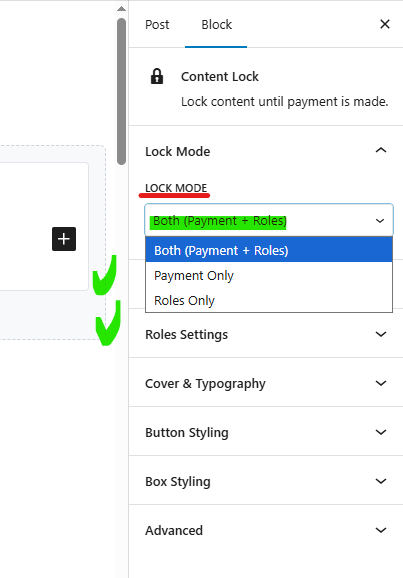
First, the most flexible mode is Both. Then, content is visible if the visitor either pays or has the required role.
For example, you offer a paid course but also give free access to your “VIP Members.” With “Both” mode:
- Add an EasyWPKit Content Lock block
- Set Lock Mode to “Both”
- Fill in the Payment URL and the Allowed Roles field
- Publish the page
As a result, VIP members see the content instantly without paying. However, everyone else sees the payment button and can unlock the content by completing the purchase.on and can unlock the content by completing the purchase.
Bonus: Quick Start with Shortcodes
First, if you use the Classic Editor or a page builder, you can insert the lock manually. Then, use this shortcode:
[ewpkcl_lock payment_url="https://..." button_text="Buy Now"]
Your secret content
[/ewpkcl_lock]
Finally, place [ewpkcl_payment_handler] on the success page. That’s it.
However, note that payment options in the shortcode require the Pro version. The free version supports role-based locking only.
How to Install EasyWPKit Content Lock (Free)
First, you can install the plugin directly from your WordPress dashboard:
- Go to Plugins → Add New
- Search for “Easywpkit Paid Content Access”
- Click Install Now, then Activate
Or download the latest .zip file here:
⬇️Download Easywpkit Paid Content Access Free
Alternatively, download the latest .zip file from WordPress.org and upload it via Plugins → Add New → Upload Plugin.
Then, go to Content Lock → Help for a step-by-step guide.
For a full walkthrough of plugin installation, see our Must-Have WordPress Plugins guide.
📖 Full documentation: EasyWPKit Content Lock Documentation — detailed guides, FAQ, and troubleshooting.
What Pro Adds (And Why You Might Need It)
First, the free version already gives you everything you need to lock content and restrict by role. However, if you want to sell access to your content, Pro is required.
Pro features
| Feature | What it does |
|---|---|
| Stripe & PayPal payments | Accept one-time payments with automatic content unlock |
| WooCommerce integration | Link any WooCommerce product to a block — unlock when order is completed |
| Unlock statistics | See who unlocked what, when, and by which method |
| Email notifications | Get an instant email every time a block is unlocked |
| Advanced styling | 16+ animations, 13+ theme presets (Glassmorphism, Neon, Dark Mode), gradient backgrounds, custom CSS |
| License protection | Secure API-based license activation with domain binding |
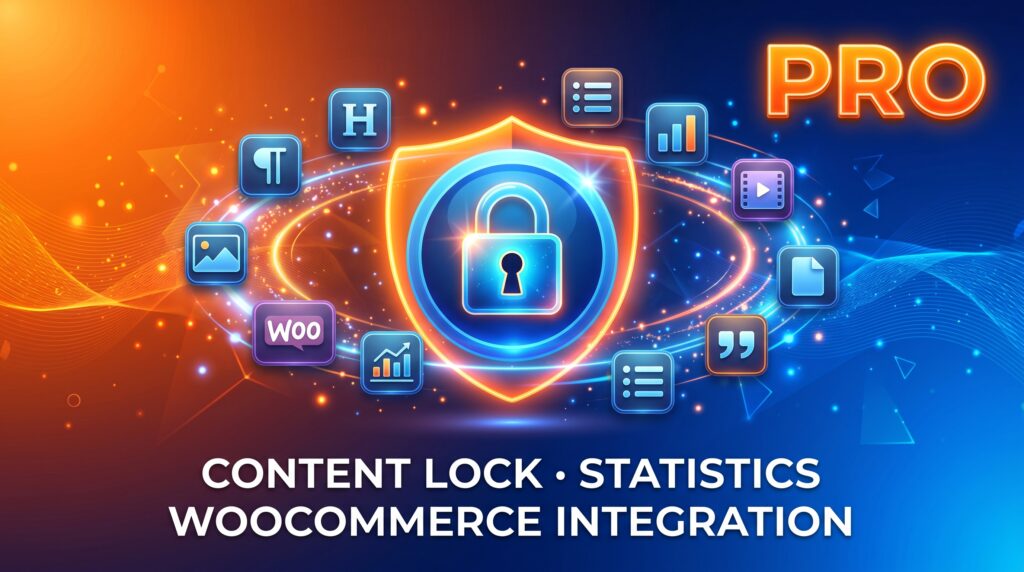
Examples of what you can do with Pro:
Style your lock blocks with a «Glassmorphism» preset and a custom CSS animation.
Sell access to a video course via WooCommerce and automatically unlock the content after payment.
Track how many times each locked block was viewed by your «Premium» members.
Get an email alert when a new customer purchases access to your premium articles.
Examples of what you can do with Pro:
- Sell access to a video course via WooCommerce and automatically unlock the content after payment.
- Track how many times each locked block was viewed by your «Premium» members.
- Get an email alert when a new customer purchases access to your premium articles.
- Style your lock blocks with a «Glassmorphism» preset and a custom CSS animation.
👉 Check out Pro plans & pricing: EasyWPKit Content Lock Pro – Pricing
📖 Pro documentation: EasyWPKit Content Lock Pro – Complete Documentation
Frequently Asked Questions
Q1: Does the free version support Stripe or PayPal payments?
No. First, payment features (Stripe, PayPal, WooCommerce) are part of the Pro add-on. Then, the free version is role-based only — it locks content for specific user roles. However, you can still use the free version to build a members-only area or premium content preview.
Q2: How do I create a custom user role for content locking?
First, install a free plugin like User Role Editor. Then, create a new role (e.g., “Premium”) and assign it to users. Finally, in the Content Lock block, type the role ID in the Allowed Roles field and select it from suggestions. As a result, only users with that role will see the hidden content.
Q3: What happens after a user pays via Stripe?
First, the user completes payment on Stripe. Then, they are automatically redirected back to your site via the Return URL you generated in the block settings. Finally, the content unlocks instantly — no manual confirmation required. As a result, the entire flow is automated.
Q4: Can I use EasyWPKit Content Lock with WooCommerce?
Yes — with the Pro version. First, you link a WooCommerce product to a locked block. Then, when the order status changes to “Completed,” the block unlocks automatically. As a result, you can sell access to courses, downloads, or premium content through your existing WooCommerce store.
Q5: Do I need to know how to code to use this plugin?
No. First, the plugin provides a native Gutenberg block with visual controls. Then, you can configure everything from the block sidebar — lock mode, payment URL, allowed roles, styling. However, if you prefer shortcodes, the Classic Editor option is available too.
Q6: Is EasyWPKit Content Lock free forever?
Yes — the free version is free forever. First, it includes role-based locking, the Gutenberg block, and the shortcode. Then, there are no usage limits, no licenses, and no hidden fees. However, payment features and advanced styling require the Pro upgrade.
Q7: What payment providers does the Pro version support?
First, the Pro version supports Stripe Payment Links and PayPal.Me for direct payments. Then, it also supports WooCommerce for product-based unlocking. As a result, you can accept payments through the provider you already use.
For more on payment integration with WordPress, see our WooCommerce Accounting Integration guide.
Key Takeaways
- EasyWPKit Content Lock is a free Gutenberg block for hiding content behind user roles
- Free version: role-based locking only (Subscriber, Author, Editor, custom roles)
- Pro version: adds Stripe, PayPal, and WooCommerce payment integration
- Three lock modes: Payment Only, Roles Only, Both
- No coding required — configure everything from the block sidebar
- Unlimited blocks, unlimited sites — no hidden fees
- Install from WordPress dashboard: Plugins → Add New → search “Easywpkit Paid Content Access”
- Pro adds: payment processing, statistics, email notifications, advanced styling
Ready to Try It?
First, install the free plugin directly from your WordPress dashboard. Then, explore the Content Lock block and set up your first role-based restriction.
👉 Download Easywpkit Paid Content Access (Free): WordPress.org Plugin Repository
📖 Full documentation: EasyWPKit Content Lock Documentation
Want more? Check out Pro plans & pricing: EasyWPKit Content Lock Pro – Pricing
Got questions? Contact us at admin@easywpkit.com — we’re always happy to help.
© 2026 EasyWPKit. EasyWPKit Content Lock is a trademark of EasyWPKit.